
Restaurant Technology
Published March 15, 2026
Sync orders from multiple delivery channels into one POS dashboard to prevent errors, update inventory in real time, and simplify menu management.

If you're running a restaurant and juggling orders from DoorDash, Uber Eats, Grubhub, and your website, managing multiple devices can be a nightmare. Multi-platform order integration solves this by syncing all orders directly to your POS system. Here's why it's a game-changer:
Bytes AI is one solution offering a unified dashboard that connects delivery platforms to your POS, automates menus, and improves order accuracy. With plans starting at $259.99/month, it reduces the stress of managing multiple systems and keeps your kitchen running smoothly.
Want to streamline your operations and improve customer satisfaction? Integrating your delivery platforms is the way forward.
Centralizing all your ordering channels can simplify operations and improve efficiency. By syncing orders from platforms like DoorDash, Uber Eats, Grubhub, and your website directly to your POS, you can avoid juggling multiple devices, reduce missed modifiers, and gain a clearer understanding of your platform performance.
When orders flow seamlessly into your POS, your kitchen display automatically receives tickets, keeping both the front-of-house and back-of-house teams in sync - even during busy hours.
"Centralizing orders into one workflow doesn't just 'save time,' it reduces the moments where mistakes happen and makes busy shifts more predictable." – Zoe Ovenden
Updating menus becomes a breeze. Adjust a price or mark an item as sold out once, and it instantly reflects across all platforms. Your team can also access delivery driver details from a single interface, cutting down on confusion. Considering that around 60% of consumers opt for delivery or takeout at least once a week, this streamlined process ensures your team can handle high order volumes with ease.
On top of that, a centralized system helps you maintain accurate stock information.
With automatic inventory syncing, you can avoid overselling items that are out of stock. When your POS registers that something is unavailable, the system updates all platforms immediately. This prevents canceled orders and unhappy customers. Plus, real-time tracking gives you a complete view of sales across channels, helping you identify which items are performing well and which aren’t.
This level of automation also plays a major role in improving order accuracy.
Manual order entry often leads to mistakes - missed instructions, wrong modifiers, or incorrect items sent to the kitchen. By automating the process and sending orders directly from the platform to your kitchen, these errors are minimized. This means fewer refunds, fewer complaints, and a more consistent experience for your customers. It all adds up to happier diners and smoother operations.
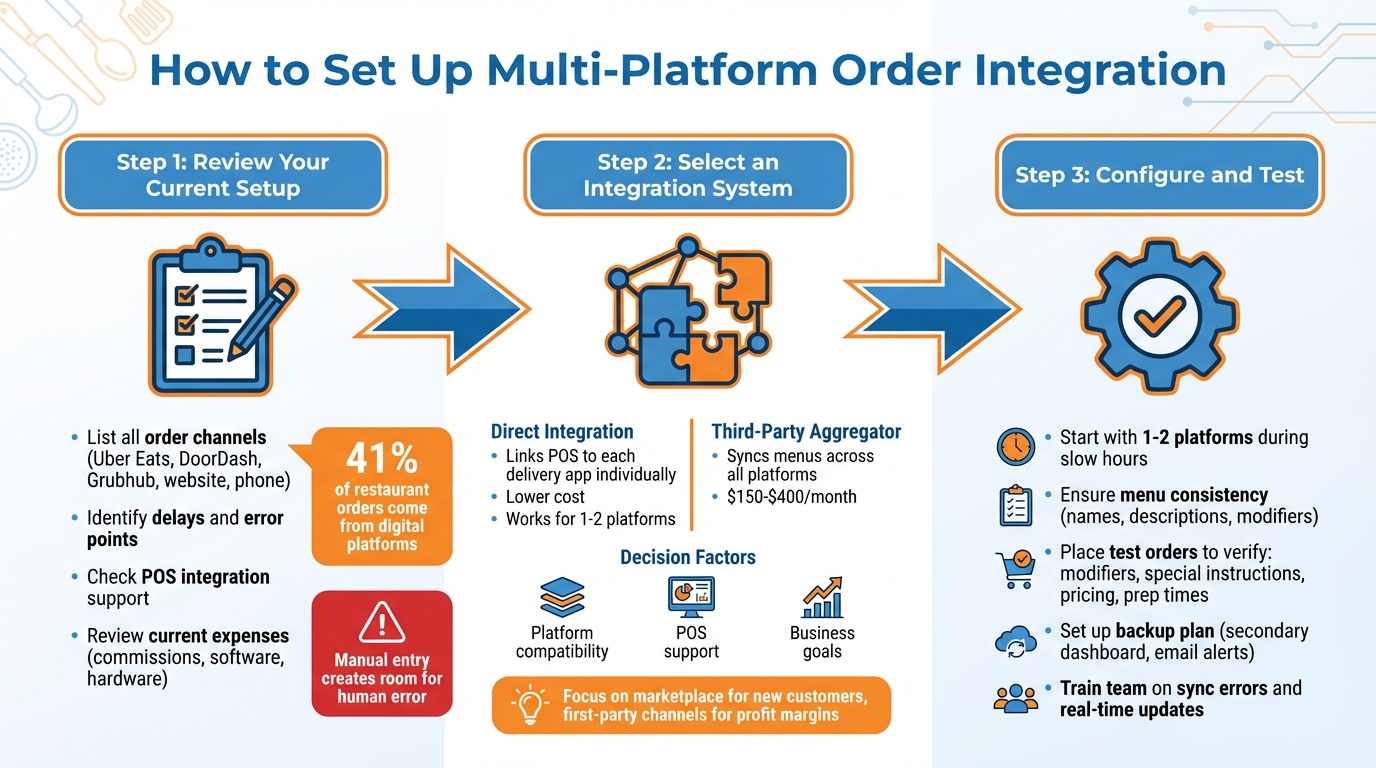
3-Step Process for Setting Up Multi-Platform Restaurant Order Integration
Integrating multiple delivery platforms can simplify your operations. By centralizing orders, you reduce manual tasks and improve efficiency. The key steps? Review your current setup, pick the right tools, and test everything thoroughly before going live.
Start by listing all the channels you use for orders - think Uber Eats, DoorDash, Grubhub, your website, and even phone orders. On average, restaurants handle orders from 2–3 different sources, with digital platforms making up 41% of all restaurant orders. If your team is juggling multiple devices (three or more), it’s a sign you might need an order aggregator to simplify things.
Next, pinpoint where delays or errors happen. For example, manual entry of online orders can lead to mistakes. Check your POS dashboard to see which integrations it supports and take stock of your current expenses. This includes commission fees, your POS software costs, and any hardware you might need.
"Without POS integration, every online order... needs to be manually entered into your system. It's this step that creates so much room for human error." – ChowNow
This audit will guide you in choosing the best integration system for your needs.
Now, decide between direct integration or using a third-party aggregator. Direct integration links your POS directly to each delivery app, like DoorDash or Uber Eats. This option works well if you only use one or two platforms since it can keep costs down. However, managing menus across multiple platforms might be trickier.
On the other hand, a third-party aggregator simplifies things by syncing menus and reporting between your POS and delivery apps. These systems usually come with a monthly subscription fee, typically between $150 and $400.
When deciding, make sure the system supports the platforms you’re already using and works with your POS. If your main goal is to attract new customers, focus on marketplace integrations. If you’re more concerned about improving profit margins, prioritize first-party channels like your own website.
Once you’ve chosen a system, it’s time to set it up and test it. Start small - integrate one or two platforms during slower hours. Make sure your menu structure is consistent, so item names, descriptions, and modifiers match across all platforms.
Place test orders to check that modifiers, special instructions, and pricing sync properly. Also, verify that prep times and delivery estimates are accurate between your POS and the delivery apps. It’s a good idea to have a backup plan, like a secondary dashboard or email alerts, to handle orders manually if any issues pop up.
After launching, keep a close eye on order accuracy and fulfillment times. Address any problems quickly. Train your team to handle sync errors and update item availability in real time using clear instructions and visual aids. This preparation ensures smoother operations and better order management across all platforms.
Bytes AI simplifies restaurant operations by consolidating orders from various platforms into one easy-to-use dashboard. It connects seamlessly with popular delivery services like DoorDash, Uber Eats, and Grubhub, ensuring a smooth and efficient workflow.
Bytes AI pulls together orders from direct channels, third-party apps, and custom websites into a single dashboard that works effortlessly with major delivery platforms. This eliminates the need for manual entry and reduces errors. The platform's standout features include:
Additional tools include branded digital platforms, catering management, and integration with your POS for real-time inventory tracking. This seamless data flow helps keep your kitchen and front-of-house operations on the same page, minimizing mistakes caused by juggling multiple systems.
Bytes AI provides two monthly plans tailored to meet different restaurant needs:
| Plan Name | Price (USD/month) | Key Features | Best For |
|---|---|---|---|
| Web & App | $259.99 | Centralized aggregation, menu sync, AI phone basics, custom websites/apps, analytics | Single-location restaurants simplifying operations |
| AI Phone Assistants | $279.99 | All Web & App features plus unlimited AI orders/minutes, catering management, priority support | Growing restaurants or multi-location chains |
Bytes AI is gearing up to roll out exciting new capabilities, including automated reservation booking, improved menu inquiry handling to cut down on call volume, and a specialized POS system for complete workflow automation. Stay tuned for these updates that promise to make restaurant management even easier.
Integration is just the starting point; managing orders efficiently every day is what keeps your operations running smoothly.
Your menu needs to be uniform across all platforms - whether it's your website, third-party delivery apps, or even printed menus in your restaurant. A 2024 study revealed that inconsistent menus across platforms can negatively impact both customer satisfaction and loyalty. To prevent this, assign a specific person or team to handle menu updates, establish a regular review schedule (weekly or monthly), and train your staff to report any discrepancies they notice.
"If everyone's responsible for the menu, no one really is" – Mari Melikyan, Orders.co
By ensuring your menu is consistent everywhere, you not only enhance the customer experience but also set the stage for leveraging your data to make smarter business decisions.
Integrated systems give you a full view of your restaurant's performance without the hassle of juggling multiple dashboards. Use this consolidated data to see which platforms bring in the most revenue and which ones come with high commission fees. This insight can guide you in refining your menu - removing items that don't sell well and spotlighting popular add-ons.
Order data can also help you pinpoint peak times, so you can adjust staffing levels accordingly. For instance, 76% of restaurant operators believe that technology like this provides a competitive edge, and centralizing your order dashboard while automating ticket printing can cut missed orders by up to 30%. Plus, analyzing purchase history allows you to send targeted promotions, boosting customer engagement and repeat business.
Once your menus are consistent and you're using data effectively, the next step is regular system reviews to keep everything running at its best. While integration reduces daily errors, ongoing reviews help eliminate inefficiencies over time.
"Closely watching your systems data ensures you're aware of what's happening in your ordering system in real-time. Doing so allows you to make informed decisions and fine-tune your operations for better performance over time" – Zoe Ovenden
Use centralized reports to monitor which platforms generate the most orders and identify any potential bottlenecks. It's also important to periodically test orders to catch syncing issues before they disrupt service. When order volumes change - whether due to a seasonal rush or new competition - review your data and adapt. This might mean throttling orders during peak times or adjusting menu availability on certain platforms to focus on profitability. With 60% of consumers opting for delivery or takeout at least once a week, keeping your system accurate is essential for maintaining steady revenue.
Handling orders across multiple platforms doesn't have to mean managing multiple devices or dealing with tedious manual data entry. Multi-platform order integration simplifies this process by bringing everything - whether it's Uber Eats, DoorDash, or your own website - into a single, unified dashboard. This setup minimizes entry errors, keeps your inventory updated in real-time, and ensures seamless communication between your kitchen and front-of-house, even during peak hours. It’s a streamlined way to keep all your delivery channels working in harmony.
Integrated systems also help maintain consistent menus and provide clear, actionable order data, making day-to-day operations much more efficient.
Bytes AI takes these benefits a step further by offering an AI-driven management solution. It consolidates orders into one dashboard, making menu management and fulfillment more straightforward. Plus, with features like reservation booking, menu inquiries, and an upcoming POS system, Bytes AI is continually evolving to reduce administrative headaches, allowing restaurant owners to focus on what they do best - serving amazing food.
Order integration generally works with the majority of modern POS systems, as long as they support APIs and real-time data updates. Many tools, like those offered by Bytes AI, are built to connect smoothly with these systems.
To get started, confirm that your POS system includes these capabilities. If it does, the integration can handle tasks like syncing menus, prices, inventory, and orders automatically. This not only saves time but also minimizes mistakes. For more information, consult your POS provider’s documentation or reach out to their support team.
To keep your menus consistent and up-to-date, real-time synchronization tools and centralized management systems are essential. By integrating your POS system, you can automatically sync menu items, prices, and availability across all platforms, eliminating the need for tedious manual updates. A centralized menu management system gives you full control, making it easy to handle regular updates or audits from one place. Automating these processes not only reduces errors but also ensures your menus stay accurate, creating a smoother experience for your customers.
To manage integration downtime effectively, it's crucial to have a solid backup plan in place. Start by using a POS system with offline functionality, allowing you to process orders locally and sync them once the system is back online. Make sure your team is trained to handle orders manually or transition to alternative methods like phone or in-person transactions. Keep an eye on your system's status regularly, and ensure technical support is readily available to tackle any outages. These precautions can help keep operations running smoothly, even during unexpected disruptions.