
Restaurant Technology
Published March 12, 2026
Connect delivery apps to your POS to centralize orders, sync menus live, automate kitchen routing, reduce errors, and lower labor costs.

Order aggregation simplifies how restaurants handle orders from delivery platforms like DoorDash, Uber Eats, and Grubhub, along with in-house orders. By connecting these orders to a POS system, restaurants can:
This integration saves time, cuts labor costs by approximately 25%, and improves order accuracy, helping restaurants handle high volumes while maintaining quality service.
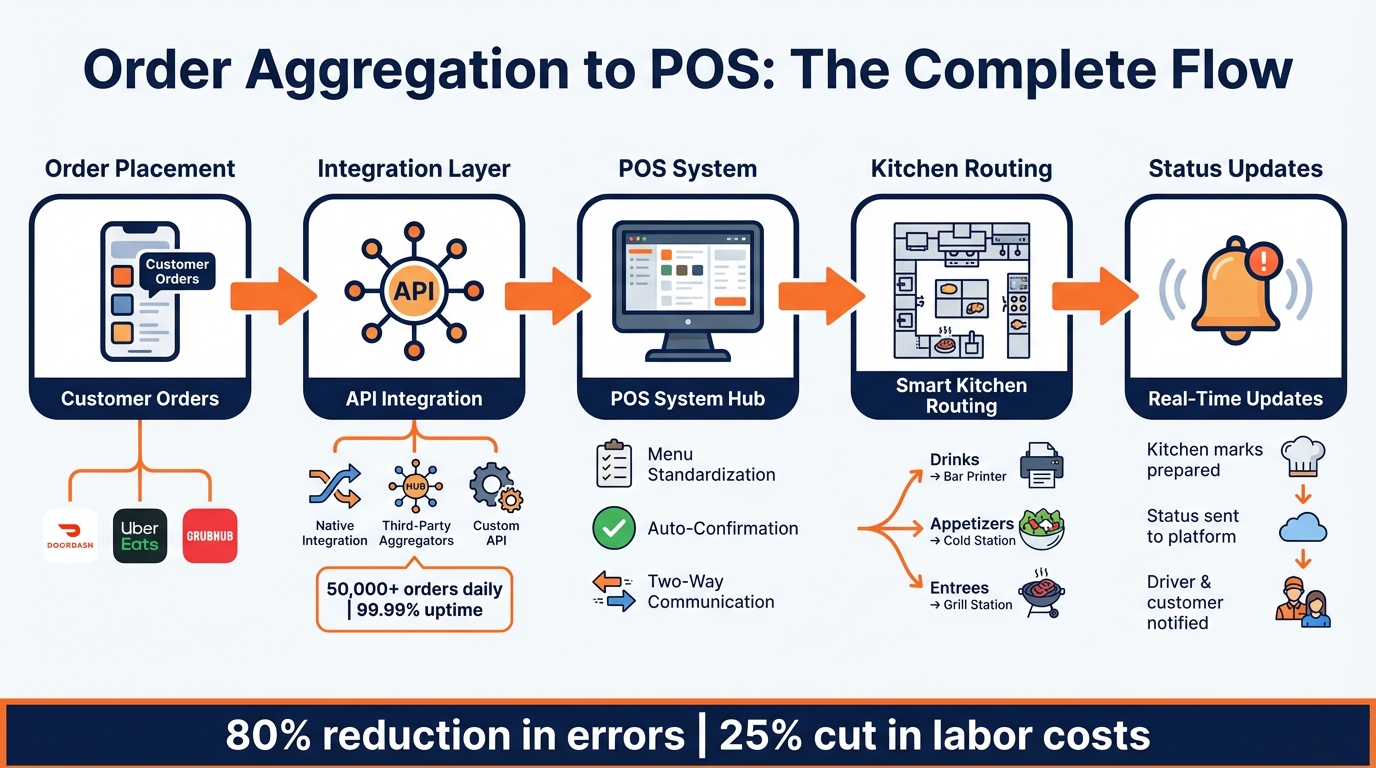
How Order Aggregation Connects POS Systems to Delivery Platforms
When a customer places an order through platforms like DoorDash or Uber Eats, it’s sent directly to your POS system using API integration. These APIs act as a link between delivery platforms and your POS, removing the need for manual data entry. There are three main ways this integration works:
For example, systems like PushPOS handle over 50,000 orders daily with a 99.99% uptime rate, showing that these connections can handle large volumes reliably.
Once the orders flow into the POS, the system standardizes menu data and simplifies kitchen operations.
After connecting, your POS takes charge of keeping menus consistent across all platforms. Any updates - like price changes, marking items as unavailable, or tweaking descriptions - are made in the POS dashboard and automatically pushed to delivery platforms using webhooks. This ensures everything stays in sync.
To avoid issues like "missing modifier" errors, businesses use menu mapping to align their POS with delivery app requirements. Standardizing item names, descriptions, and modifiers is key to preventing order cancellations and ensuring a smooth experience for customers.
The real-time updates don’t stop at order entry. Once an order arrives in the POS, it triggers efficient kitchen workflows. The system can auto-confirm orders based on pre-set rules and route them to the correct kitchen stations. For example, a single Uber Eats order might send drinks to the bar printer, appetizers to the cold station, and entrees to the grill.
The POS also enables two-way communication by sending order status updates back to the delivery platforms. When the kitchen marks an item as prepared, that status is shared instantly with drivers and customers. During busy times, managers can pause delivery or adjust preparation times directly from the POS interface to help balance the workload.
"PushPOS Order Aggregation... eliminates manual input and ensures a faster, smoother order fulfillment process." - PushPOS
Modern POS systems are designed to simplify order management and improve efficiency by centralizing various processes into a single platform.
Gone are the days of juggling multiple devices to manage orders from different platforms. Today’s POS systems bring everything together on one dashboard. Whether it’s delivery, online orders, or in-house dining, all incoming orders are displayed in a single interface. With direct POS integration, orders arrive automatically, complete with item details, modifiers, and special instructions, all formatted for kitchen use. Plus, the dashboard offers real-time updates, such as tracking order statuses, driver locations, and key pickup milestones.
Advanced POS systems let you set up custom routing rules to streamline kitchen operations. For instance, a delivery order can be split automatically: drinks sent to the bar, appetizers to the cold-prep area, and entrees to the grill - no manual steps required. Restaurants can choose to auto-confirm orders for instant processing or manually review them for added control. Additionally, features like order throttling allow managers to limit third-party orders during busy times, ensuring the kitchen doesn’t get overwhelmed.
Integrated reporting tools within modern POS systems collect sales data from all channels - whether third-party apps or in-house transactions - into a single dashboard. This eliminates the hassle of reconciling multiple statements at the end of the day. Beyond summarizing revenue, these reports highlight which platforms generate the most orders, help analyze profit margins after commissions, and provide detailed logs for easier accounting. It’s a smarter way to track performance and make informed decisions based on clear, consolidated data.
Linking order aggregation to your POS system can completely change how your restaurant handles third-party orders. This integration boosts efficiency, cuts down on mistakes, and enhances customer satisfaction, all while setting your business up for growth. By streamlining operations, it allows your team to deliver faster service and maintain high-quality experiences for your customers.
Automating order entry removes the risk of manual mistakes, ensuring that customer instructions are captured correctly. Studies show that a smooth, automated workflow reduces missed orders and incorrect modifiers. And let’s face it - speed matters. Customers tend to lose patience after about 29 minutes, so quick and accurate processing is essential.
The delivery market is expanding at an impressive 9.49% annually, with more than half of consumers (52%) considering ordering food a necessity. Order aggregation helps your team handle increasing order volumes without the need for additional staff. A unified system simplifies training, makes shift changes smoother, and eliminates the hassle of managing multiple devices. Plus, centralized reporting gives you insight into peak delivery times, helping you fine-tune staffing levels and control labor costs without compromising service.
When orders are processed quickly and accurately, customers notice. Auto-formatted orders ensure meals are prepared correctly the first time and delivered promptly, building trust and encouraging repeat business. On top of that, reducing the stress on your staff allows them to focus more on food quality, elevating both the dining and delivery experience for your customers.
Streamlining your order aggregation with your POS system is a practical step toward keeping your operations running smoothly. While it might seem like a daunting task, breaking it down into manageable steps can help you avoid disruptions and set your team up for success. Many restaurants find it helpful to start small - integrating just one or two delivery platforms - before scaling up to include all their partners.
Begin by evaluating your current setup. Make a list of the delivery apps you use and identify your POS model. This will help you figure out whether your system supports direct integrations or if you'll need a middleware solution to fill the gap. Older or proprietary POS systems often lack the capability to handle modern API-based connections, making an aggregation platform essential for bridging the divide between your POS and delivery services.
When comparing integration options, don’t just focus on the subscription fees. For example, Bytes AI offers seamless connectivity with major delivery platforms and centralized menu management. This allows you to update prices and availability once and push those changes across all platforms simultaneously. Keep in mind that setup and monthly costs will depend on the complexity of your system and any required customizations.
Once your integration is ready, the next step is ensuring your staff is equipped to use it effectively.
Training your team on an order aggregation system is typically quick - most employees can get up to speed in under an hour. Focus on teaching them the essentials, like managing the menu, confirming orders, and reviewing performance metrics. Staff should also know how to pause deliveries across all platforms during busy times and adjust prep times from a single dashboard, eliminating the need to juggle multiple devices.
To reinforce this training, create clear standard operating procedures (SOPs). These can include visual guides posted near the POS station, providing quick answers to common questions. This way, your team can troubleshoot minor sync issues without wasting time during peak hours. Highlight the time-saving benefits of automated order routing, which eliminates manual data entry and ensures orders go directly to the correct kitchen stations.
Once your staff is comfortable, you can move on to refining your workflows.
Start by testing your system during off-peak hours to avoid interrupting service. Check that all order details, such as modifiers and pricing, are printing correctly. Once the system is live, keep an eye on key metrics like order accuracy and fulfillment time to identify any areas for improvement.
Consistency is crucial when managing menus across multiple platforms. Align item names, descriptions, and modifiers to avoid sync errors and reduce the risk of order mistakes. You can also set up custom routing rules - for example, sending drink orders to the bar printer, main courses to the kitchen line, and desserts to the pastry station. This kind of automation helps maintain a smooth workflow, even when orders are pouring in from multiple channels at once.
Bringing order aggregation into your POS system simplifies the way third-party orders are managed. By channeling everything into a single hub, it eliminates the delays and errors that often come with manual data entry. With automatic updates and precise routing, operations stay smooth and efficient. In fact, integrated platforms boast a 99% order success rate, leading to fewer mistakes, quicker fulfillment, and happier customers.
This streamlined approach not only improves daily operations but also prepares your business for long-term growth. Staff can focus more on delivering great food and service, while the system adapts seamlessly as your business expands.
Switching from juggling multiple tablets to a unified system isn’t just about making life easier - it’s about protecting your margins, cutting down on errors, and maintaining the level of service that keeps customers coming back. Whether you’re managing one location or growing to several, integrating order aggregation with your POS builds a solid foundation for future success.
If your POS system supports integration with online ordering platforms and APIs, order aggregation can work seamlessly with it. This setup pulls all orders into one centralized dashboard, making it easier to manage. By consolidating third-party orders in one place, it improves efficiency and reduces the chances of errors.
To keep your menus consistent and error-free, it's crucial that your POS system supports real-time updates and works seamlessly with your digital menu platforms. Real-time synchronization ensures that any changes to menus, prices, or inventory are instantly reflected across all channels. This not only saves time but also eliminates the risk of mismatched menus.
Here’s what you can do to stay on top of it:
By addressing these areas, you can minimize manual updates and avoid frustrating your customers with outdated or incorrect menu information.
If the integration fails, it can throw a wrench into several critical areas: order flow might come to a halt, payment processing could be interrupted, data might get corrupted, loyalty programs could be rendered useless, and reconciliation efforts may face complications - particularly for businesses operating across multiple locations. These kinds of disruptions can seriously affect day-to-day operations, making swift resolution crucial to keep things running smoothly.