
Restaurant Technology
Published March 20, 2026
How local restaurants use geo-targeted ads—choose the right radius, platforms (Google, Meta, TikTok), local ad copy, landing pages, and tracking to boost visits.

Geo ads can help local restaurants attract nearby customers when they’re most likely to act - like searching for “pizza near me” on a Friday night. By targeting users within a specific radius, you can boost foot traffic, increase conversions, and make the most of your ad budget. Platforms like Google Ads, Meta (Facebook/Instagram), and TikTok offer tools to target diners by location, time of day, and even interests.
Key Takeaways:
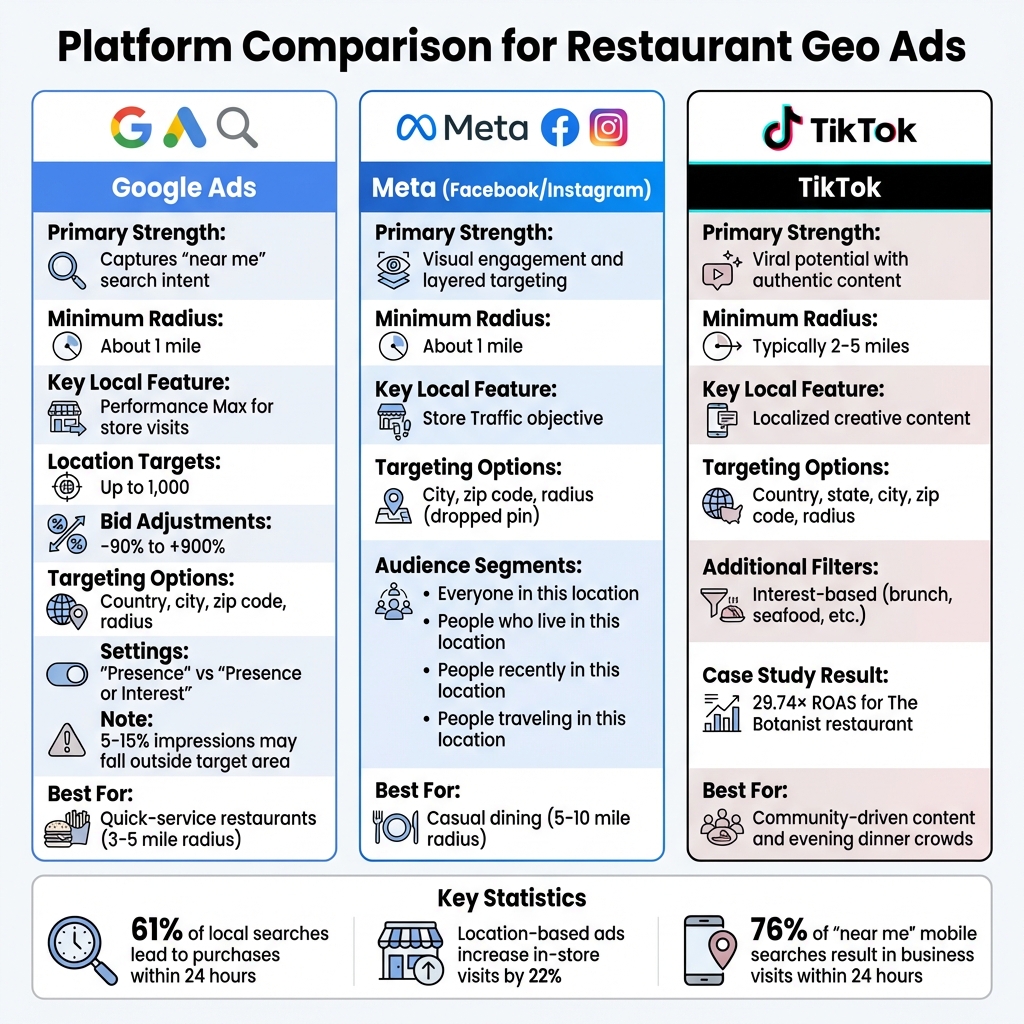
Restaurant Geo-Targeting Platform Comparison: Google Ads vs Meta vs TikTok
Each platform approaches geo-targeting in its own way, offering unique tools to help restaurants attract local diners. Here’s a closer look at how these platforms operate and how you can use them to drive foot traffic.
Google Ads is great for capturing high-intent searches like “Italian restaurant near me.” You can target by country, city, zip code, or radius, with a minimum radius of about 1 mile for U.S. audiences. A key feature is the distinction between “Presence” (people physically in your target area) and “Presence or Interest” (people either in or searching for your area). For local restaurants, the “Presence only” setting can help you avoid wasting your budget on irrelevant clicks.
Meta (Facebook/Instagram) combines visual storytelling with precise targeting. You can define your audience by city, zip code, or radius using a dropped pin, and refine further with options like “Everyone in this location,” “People who live in this location,” “People recently in this location,” or “People traveling in this location.” This flexibility allows you to craft promotions for both locals and visitors.
TikTok offers targeting at the country, state, city, and zip code levels, as well as radius-based options. You can pair geographic targeting with interest filters, such as focusing on users interested in “brunch” or “seafood.” Similarly, X (formerly Twitter) enables location-based targeting alongside demographic and interest filters, though it’s less commonly used for restaurant ads.
Each platform has features tailored for reaching local diners effectively:
| Platform | Primary Strength | Minimum Radius | Key Local Feature |
|---|---|---|---|
| Google Ads | Captures "near me" search intent | About 1 mile | Performance Max for store visits |
| Meta (FB/IG) | Visual engagement and layered targeting | About 1 mile | Store Traffic objective |
| TikTok | Viral potential with authentic content | Typically 2–5 miles | Localized creative content |
Platforms also allow you to align campaigns with real-world signals, making your ads even more relevant. For instance, weather-triggered bidding can automatically increase bids during rainy days in specific neighborhoods, attracting diners who prefer to stay close to home. Similarly, tools can adjust bids based on temperature, precipitation, or local events.
Dayparting is another way to fine-tune your campaigns. For example, run Google Ads early in the morning to attract breakfast diners, and use TikTok ads in the evening to catch dinner crowds. By syncing your ads with your audience’s schedule, you can maximize engagement.
Combining geographic targeting with interest-based filters can take your campaigns to the next level. Instead of targeting everyone within a 5-mile radius, focus on diners who’ve shown interest in specific themes like brunch or seafood. For example, The Botanist restaurant used TikTok Spark Ads with creator-led content to reach local audiences, resulting in 1.5 million views, over 700 bookings, and a 29.74× return on ad spend.
Event-based promotions also perform well on platforms like TikTok and Instagram. Highlighting content from local festivals or events can help you build trust and attract diners within a 2–5 mile radius. Forbes Functions, a New York City event planning business, used TikTok’s geographic targeting and “Promote” feature over three months to expand its local following and secure new bookings.
"Marry real-world signals (weather, events, traffic) to local intent, and your budget stops shouting and starts timing its whispers." – Zeely AI
To create a successful geo ad campaign, focus on selecting the right target area, crafting ads that resonate locally, and building a landing page designed to convert visitors into customers.
The geographic range of your campaign should align with how far customers are typically willing to travel for your restaurant. Here's a quick guide to help you decide:
| Restaurant Type | Recommended Radius | Rationale |
|---|---|---|
| Quick-Service | 3–5 miles | Customers prioritize convenience and rarely travel far. |
| Casual Dining | 5–10 miles | A longer drive is acceptable for a dining experience. |
| Urban Restaurant | 3–7 miles | High competition limits how far customers will travel. |
| Suburban Restaurant | 10–15 miles | Fewer dining options allow for a broader reach. |
| Specialty/Destination | 15–30+ miles | Unique offerings encourage longer travel distances. |
Start with a smaller radius and expand only after seeing positive results. A practical approach is to use concentric radii - set up zones at 1 mile, 5 miles, and 10 miles, and adjust your bids to prioritize customers closest to your location.
Use "Presence" targeting to focus on people physically near your restaurant. However, expect 5–15% of impressions to fall outside your target area due to GPS or IP address inaccuracies. To avoid wasted ad spend, exclude areas you can't serve or those dominated by competitors.
Once you've defined your range, shift your attention to creating ad copy that speaks directly to local audiences.
Well-targeted, location-specific ad copy grabs attention and ensures your budget is spent on people most likely to visit. Incorporate neighborhood names, landmarks, or postal codes to make your ads feel relevant. For instance, instead of saying "Great Italian Food", try "Authentic Italian in Downtown Brooklyn" or "Just Two Blocks from Central Park".
Connecting your messaging to local events or activities can also make your ads more relatable. For example, if your restaurant is near a popular farmers market, you could say, "Fuel Up Before the Saturday Market - Fresh Breakfast in Midtown." Dynamic keyword insertion is another useful tool - it allows your ad text to update automatically with the user’s specific city or neighborhood, creating a personalized feel.
Visuals are just as crucial as the words. Use real photos of your storefront, staff, and community instead of generic stock images. This approach builds trust, especially since 76% of people who search "near me" on their phones visit a related business within 24 hours.
To drive action, emphasize urgency and local offers. Phrases like "Join Us Tonight in [Neighborhood Name]!" or time-sensitive promotions can encourage immediate visits. Keep in mind, 61% of local searches lead to a direct conversion.
Once your ads are set, your landing page should seamlessly continue the local focus. Consistency is key - if your ad mentions a specific neighborhood or deal, the landing page headline should reflect that to maintain trust.
Make sure your Name, Address, and Phone number (NAP) are prominently displayed. Mobile-friendly design is essential, with clear conversion paths and click-to-call buttons readily accessible. Including an embedded map makes it easy for visitors to get directions with just a tap.
Build trust by featuring testimonials and reviews from local customers. Use images of familiar landmarks or your restaurant's interior and staff to create a connection with the community.
For technical optimization, add LocalBusiness Schema markup to help search engines understand your location. If you're targeting multiple neighborhoods, create unique landing pages for each one. Tailor content to the specific community by highlighting nearby landmarks or promoting local events. This effort can pay off, as hyperlocal targeting within a 1-mile radius can deliver 3x better conversion rates than broader campaigns.
With your geo ad campaigns up and running, refining your approach can make a big difference in reaching local diners effectively.
Generic ads just don’t cut it. Hyper-localized ads grab attention because they feel relevant. Use neighborhood names, landmarks, or even local events in your copy. For example, instead of saying "Great Tacos", try "Best Tacos on Capitol Hill" or "Two Blocks from Pike Place Market." It shows you’re part of the community, not just another business.
Timing matters too. Dayparting - running ads at specific times - lets you match offers to when people are most likely to act. Promote breakfast deals early in the morning, lunch specials around noon, and happy hour menus in the late afternoon. With 51% of customers discovering restaurant deals through mobile apps, syncing your ads with their schedules is key.
Tailor your messaging to the location. Near a gym? Highlight healthy options like plant-based bowls. By office buildings? Focus on quick service or catering for teams. If there’s a local festival or concert, expand your geofence to include the venue and offer event-specific promotions like "Grab Dinner Before the Show" or "Late-Night Eats After the Concert."
Chick-fil-A demonstrated the power of personalization by using Amplitude's analytics to adjust menu layouts based on customer preferences. This strategy led to a 23% increase in delivery orders and a 50% boost in upsell revenue through tailored recommendations.
Once your ads feel personal and relevant, the next step is to test and fine-tune their performance.
Testing is the only way to know what works best for your audience. Focus on one variable at a time, like your headline, image, call-to-action, or targeting radius. Changing everything at once makes it impossible to pinpoint what’s driving results.
Start with targeting settings. Compare "Presence only" (people physically in your area) to "Presence or interest" (people researching your area). For restaurants, "Presence only" often reduces wasted ad spend by avoiding clicks from people not nearby.
Experiment with radius sizes - 3 miles, 5 miles, or 10 miles - to find the balance between reach and relevance. Test localized copy against generic versions and adjust bids based on performance. For example, increase bids in high-performing neighborhoods by up to +900%, and reduce them by as much as -90% in areas that don’t convert. Wait for at least 30 conversions before making big changes to ensure your data is reliable.
A Boston dental clinic used geo-targeted ads with a strict 10-mile radius and location-specific copy. Their cost per click dropped from $2.50 to $1.10, click-through rates increased 45%, and new patient sign-ups doubled within three months. Restaurants can achieve similar results by focusing on specificity.
Visuals matter too. Google Business Profiles with 20–30 high-quality photos get 42% more driving direction requests than those without. Test different types of visuals - professional food photos, user-generated content, or behind-the-scenes videos - to see what resonates most with locals.
No matter how great your ads are, inconsistent business details can undermine your efforts. Your Name, Address, and Phone number (NAP) need to match across every platform - Google Business Profile, Facebook, Instagram, your website, and ad landing pages. Even small differences like "St." versus "Street" or varying phone formats can confuse search engines and customers.
89% of marketers reported higher sales after adopting location-based marketing, but those results hinge on accurate data. When your NAP information doesn’t align, search engines struggle to verify your business, hurting your local search rankings and making it harder for customers to find you.
For restaurants with multiple locations, create separate campaigns for each time zone to ensure time-sensitive offers appear at the correct local time. A lunch special at 11:00 AM should go live at 11:00 AM in each market - not all at once.
ASUS implemented standardized data practices across its global marketing efforts and saved about 90 hours per week by automating data normalization. While your restaurant may not operate on that scale, the principle applies: consistent information saves time and improves your campaigns.
"Improvado helped us gain full control over our marketing data globally. Previously, we couldn't get reports from different locations on time and in the same format, so it took days to standardize them. Today, we can finally build any report we want in minutes due to the vast number of data connectors and rich granularity provided." - Jeff Lee, Head of Community and Digital Strategy, ASUS
To avoid inconsistencies, create a simple spreadsheet or document listing your official NAP details, business hours, and key messaging. Use it as a reference whenever you update profiles, create ads, or build landing pages. This small step ensures your geo-targeting efforts stay on track and effective.
To get the most out of your geo-targeted ads, focus on tracking high-intent actions like phone calls, direction requests, online bookings, and lead form submissions. These activities are far more meaningful indicators of customer interest than impressions or clicks alone.
The ultimate measure of success is whether your ads are driving revenue. Keep a close eye on Return on Ad Spend (ROAS) - aim for at least 3x, meaning every dollar spent generates three dollars in revenue. Additionally, monitor your Cost Per Acquisition (CPA) to ensure your campaigns remain profitable.
For example, in late 2025, a farm-to-table restaurant in Montclair, NJ, used tracking to uncover that Instagram ads yielded a 35% ROI, while SMS marketing delivered a staggering 1,826% ROI. By reallocating their budget from Instagram to SMS and offering a free appetizer on Tuesday nights, they increased Tuesday reservations by 73% (from 22 to 38) and boosted their overall marketing ROI by 340% in just three months.
To gather similar insights, set up Google Analytics 4 key events to track specific local actions like "reservation_made", "order_placed", and "direction_requests". Another effective method is using unique promo codes for different areas, such as "DOWNTOWN15" or "MIDTOWN20", to identify which neighborhoods respond best. Considering that 76% of smartphone users who perform a local search visit a related business within 24 hours, tracking these immediate actions can reveal what’s driving results.
Use these insights to fine-tune your bids and expand your campaigns in areas that perform the best.
Once you've identified campaigns that consistently deliver results, scale them strategically. For example, expand campaigns in locations that achieve 30+ conversions. Adjust bids aggressively - up to +900% in high-performing areas - and reduce bids by up to –90% in places where conversions are consistently low. Regularly review geographic reports to spot trends and refine your targeting.
Hyperlocal targeting, such as focusing on a 1-mile radius, can yield conversion rates three times higher than broader approaches. To make this work, switch from "Presence or interest" targeting to "Presence only", ensuring your ads are shown to people physically in your area rather than casual browsers. Mobile GPS data also tends to provide more precise targeting than desktop IP addresses.
Another tactic is testing weather-triggered bidding. For instance, during rain or snow, increase bids for delivery-focused ads to capture shifts in consumer behavior that drive more online orders. Similarly, if you notice slow nights at your restaurant, use geo-targeted SMS alerts to fill empty tables in real time.
While national chains may have bigger budgets, you can outmaneuver them by going hyperlocal. Create geofences of 0.5–2 miles around competitor locations and apply aggressive bid adjustments of +50% to +100% to attract high-intent customers.
At the same time, apply location exclusions to avoid wasting money in areas where conversions are low. For instance, if certain zip codes consistently show high CPA and low conversions - perhaps due to competitor dominance or logistical issues - either exclude those areas entirely or reduce bids by 20–50%. Stay vigilant by regularly reviewing geographic reports to detect shifts in competition.
To maximize performance during peak dining times, increase bids by 40% during lunch (11:00 AM–1:00 PM) and dinner (5:00 PM–8:00 PM) when local search activity is highest. Tailor your ad creative to mention specific neighborhoods or distances, like "5 minutes away", which can improve click-through rates by 47% and reduce CPA by 23%.
Finally, bridge the gap between online and offline performance by tracking offline conversions. Connect your ad platforms to your POS system using tools like the Facebook Offline Conversions API or Google Store Visit tracking. These tools can help you link ad impressions to actual foot traffic and sales, giving you a clearer picture of your campaign's effectiveness.
Running geo-targeted campaigns is a great way to draw attention to your restaurant, but it’s only half the battle. If your business isn’t equipped to handle the surge in traffic these campaigns can bring, you might miss out on turning interest into actual sales. With 82% of smartphone users performing "near me" searches and 61% of those searches leading to a purchase within 24 hours, having the right systems in place is essential.
One of the biggest challenges restaurants face with geo ads is managing high call volumes. When ads drive a flood of interest during peak hours, your staff can get overwhelmed. That’s where Bytes AI steps in. For $279.99/month, its phone assistant can handle incoming calls, freeing up your team to focus on serving in-person customers.
Another key feature is centralized order aggregation. Running campaigns across platforms like Google and Meta can create chaos in the kitchen if orders aren’t properly managed. Bytes AI solves this by consolidating orders from multiple channels into one streamlined dashboard, ensuring your team isn’t scrambling during busy periods.
Looking ahead, Bytes AI plans to introduce automated reservation booking and menu inquiry handling, which will further reduce the manual workload during traffic spikes.
Geo-targeting platforms offer a variety of tools to help you reach customers effectively. Here's a look at how different platforms stack up:
| Platform | Targeting Methods | Radius Options | Restaurant Use Case |
|---|---|---|---|
| Google Ads | Zip code, City, Radius, Location Extensions | 1–500 miles | Capturing "near me" searches with click-to-call buttons |
| Meta (FB/IG) | Drop pin, City, Custom location lists | 1–50 miles | Local awareness ads with map cards and directions |
| Programmatic/DSP | Geofencing, Real-time proximity, Dwell time | Under 1 mile (Hyperlocal) | Targeting competitors' customers or event attendees |
| Waze/Maps | Map-based placements, Branded pins | Proximity-based | Driving spontaneous "on-the-road" dining decisions |
Each platform has its strengths. Google Ads is ideal for capturing active search intent, while Meta excels at creating visually engaging ads for local audiences. Programmatic platforms offer hyperlocal precision, making them great for geofencing strategies, and Waze is perfect for attracting diners on the go.
Geo-targeted advertising gives local restaurants a powerful edge in their immediate markets. While national chains may have bigger budgets, they often lack the pinpoint accuracy that comes with targeting customers within a 1-mile radius. This hyperlocal strategy can deliver conversion rates up to 3x higher than broader campaigns, turning casual searches into real-time actions.
But driving traffic is just the first step. To turn that traffic into results, your technology must keep pace with the increased demand. Whether it’s handling a spike in call volumes during busy times or managing orders across multiple platforms, having the right tools is essential. For example, Bytes AI simplifies these challenges by streamlining call management and consolidating orders, ensuring your operations run smoothly.
Success with geo ads also requires constant testing and fine-tuning. The top-performing restaurants don’t just set and forget - they regularly test ad variations, adjust their targeting, and focus on mobile optimization, where 76% of location-based interactions happen. Establish clear benchmarks, like pausing ads with a click-through rate below 1.5%, and shift budgets toward campaigns that deliver results. Testing and refining your approach ensures your efforts stay effective.
Start small, track your performance closely, and scale up what works. Combine precise targeting with dependable technology to consistently bring local diners through your doors.
To determine the best geo-targeting radius for your restaurant, it’s smart to concentrate on a hyper-local area. This approach helps you stay relevant and get the most out of your investment. A 1-mile radius is often a great starting point since it focuses on nearby customers who are more likely to stop by. Take a look at how far your typical customers travel to visit, and tweak the radius based on what you’re aiming for - whether it’s increasing foot traffic or highlighting special deals. The key is to ensure your radius matches your local market and aligns with how your customers behave.
To monitor in-store visits generated by geo-targeted ads, you can use tools like the store visit tracking feature in Google Ads. This feature leverages mobile location data to connect physical visits to your ad campaigns. Another effective method is geofencing, which sets up virtual boundaries around your restaurant. When a device enters these zones, it can trigger targeted ads or specific actions, allowing you to measure how well these strategies boost foot traffic.
To get better outcomes with geo ads for your restaurant, try experimenting with hyperlocal campaigns such as geofencing. This approach allows you to target customers who are physically close to your restaurant by sending ads or notifications directly to their mobile devices as they enter a defined area. It’s a great way to connect with nearby customers in real time and increase foot traffic. Be sure to track how well these ads perform so you can fine-tune your campaigns and achieve even stronger results.