
Restaurant Technology
Published March 18, 2026
Learn how AI automates kitchen staff scheduling to cut labor costs, forecast demand, ensure compliance, and save managers hours weekly.

AI kitchen staff scheduling saves time, reduces costs, and improves accuracy. Restaurants spend 15–20 hours weekly on manual scheduling, yet 38% of schedules are inefficient. AI uses data like sales trends, weather, and events to create precise schedules in minutes, cutting labor costs by 8–18% and scheduling time by 75%. It ensures compliance with labor laws, avoiding fines averaging $25,000. By forecasting demand with 85–90% accuracy, it balances staffing needs, reduces turnover, and handles real-time changes like sudden rushes or slowdowns. This modern solution transforms scheduling into a data-driven, efficient process, giving managers more time to focus on enhancing guest experiences.
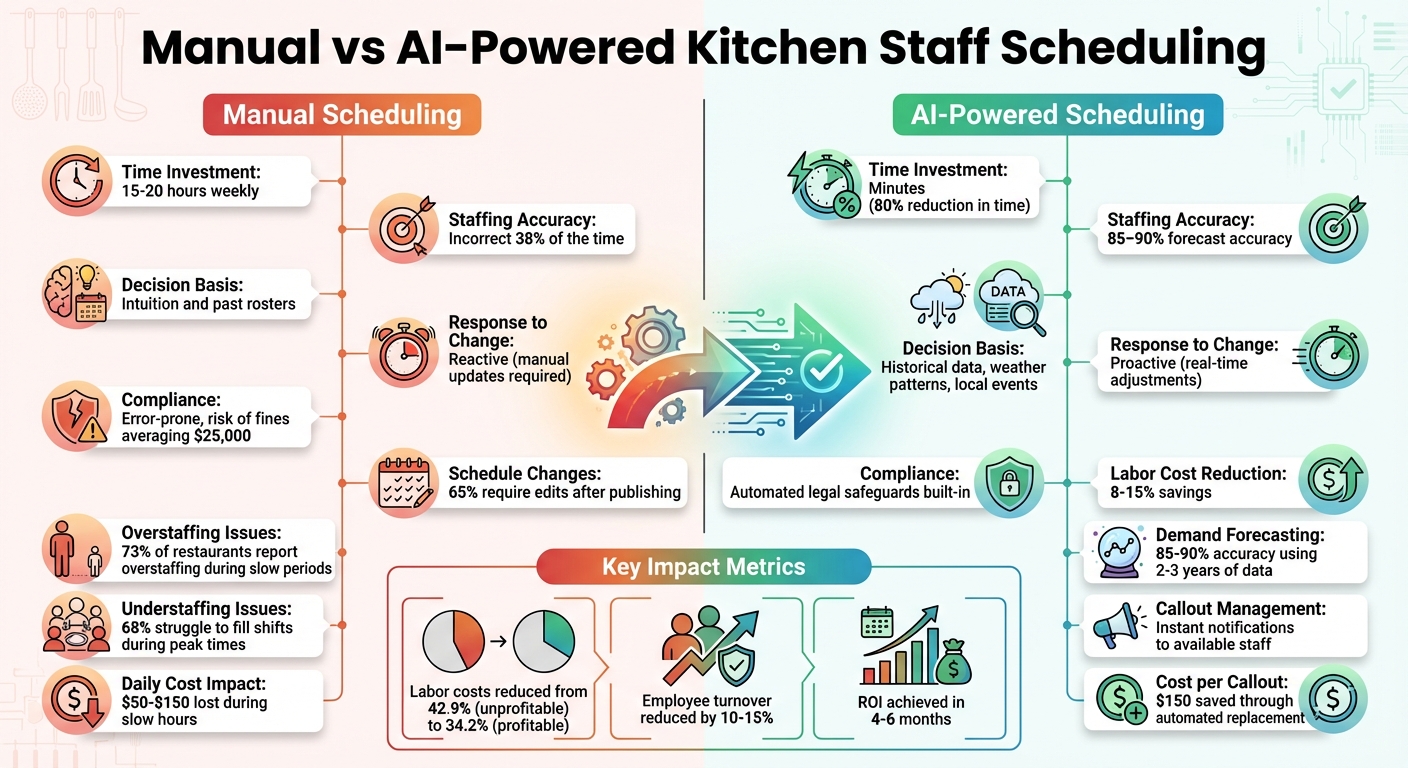
Manual vs AI-Powered Kitchen Staff Scheduling Comparison
AI kitchen staff scheduling leverages machine learning and data analytics to create work schedules for restaurants automatically. Instead of relying on guesswork, it analyzes 2–3 years of data, including sales trends, weather patterns, special events, and employee availability, to predict staffing needs with precision.
This technology evaluates thousands of schedule combinations to optimize labor costs, certifications, and staff availability all at once. It’s smarter because it uses real data. For instance, if a 5°F temperature drop typically leads to a 10% increase in delivery orders, the system adjusts staffing levels accordingly. The entire process is powered by several key components, which are outlined below.
"The shift from manual to algorithmic isn't just faster. It's a different category of decision-making–one that processes more variables, more accurately, every time." - Ali Amin, Editor-in-Chief, Griddl
AI scheduling systems rely on four main components working in harmony. Demand forecasting uses historical sales data and external factors - like weather, local events, and holidays - to estimate customer traffic with an accuracy rate of 85% to 90%. Automated generation then creates schedules that balance labor costs, service demands, and employee availability, a process that could take hours for a human manager.
Real-time adjustments allow the system to respond instantly to live POS data. For example, if sales are unexpectedly slow, the AI might suggest cutting shifts early. Conversely, during a sudden rush, it can identify and notify available employees to fill gaps. Lastly, compliance guardrails ensure schedules adhere to labor laws, break requirements, and overtime limits, helping restaurants avoid costly fines, which average $25,000 per violation.
The structured, data-driven approach of AI highlights the inefficiencies of manual scheduling. Despite the time and effort invested, restaurants are improperly staffed 38% of the time, which means either overpaying for unnecessary staff or losing revenue due to being understaffed.
The stats are clear: 73% of restaurants report overstaffing during slow periods, while 68% struggle to fill shifts during peak times. These inefficiencies can cost businesses $50 to $150 per day during slow hours, and 64% of customers will leave if they face long wait times caused by understaffing. Unlike AI, manual scheduling is static and cannot adapt to real-time changes without frantic phone calls, texts, and last-minute adjustments. In fact, 65% of manual schedules require edits after being published.
| Feature | Manual Scheduling | AI-Powered Scheduling |
|---|---|---|
| Time Investment | High | Minutes (80% reduction) |
| Staffing Accuracy | Incorrect 38% of the time | 85–90% forecast accuracy |
| Basis for Decisions | Intuition, past rosters | Historical data, weather, events |
| Response to Change | Reactive (manual updates) | Proactive (real-time adjustments) |
| Compliance | Error-prone, risk of fines | Automated legal safeguards |
AI-powered scheduling systems go beyond just organizing shifts - they play a key role in cutting costs, adapting to changing conditions, and staying compliant with labor laws.
Aligning staffing levels with real-time demand, AI scheduling can reduce labor costs by 8–15% while keeping overall expenses in check. To put this into perspective, profitable restaurants typically maintain labor costs around 34.2% of sales, whereas unprofitable ones often exceed 42.9%. During slow times, AI systems automatically scale back staff, and when demand spikes, they quickly find available employees to fill the gaps.
AI scheduling can save managers up to 80% of the time they’d normally spend creating schedules, letting them focus on improving customer experiences instead of battling spreadsheets. Last-minute callouts, which can cost around $150 each, are easier to manage with real-time notifications that connect managers to available staff immediately. For instance, one restaurant in 2025 reported cutting 48 hours of phone-related labor each month, saving over $1,000 in payroll costs while also increasing upsell revenue. This highlights how AI scheduling doesn’t just save time - it also positively impacts the bottom line.
AI scheduling shines during busy periods by adapting to real-time conditions. When unexpected surges in customer traffic occur - due to weather changes or local events - the system recalculates staffing needs mid-shift using live POS data. This prevents understaffing and reduces the need for costly overtime. On the flip side, if sales dip, the AI can trigger early shift releases to avoid unnecessary labor costs while maintaining team morale. A great example of this is a large restaurant chain that, in 2025, used an AI-powered assistant across more than 10,000 locations to improve forecasting-based scheduling. This move helped them significantly cut operational overhead.
AI scheduling also simplifies compliance with labor laws by embedding regulations directly into its logic. It ensures overtime limits, mandatory rest periods, and proper shift structures are followed automatically. This proactive approach helps prevent costly fines, which can average $25,000 or more in some cases. For instance, a California restaurant in 2025 successfully used an AI compliance engine to manage predictive scheduling laws, avoiding penalties while ensuring mandatory shift notifications and rest periods were observed. Additionally, real-time alerts notify managers when adjustments are needed, such as when an employee is nearing overtime, ensuring both compliance and guest service standards are upheld.
"AI allows restaurants to serve both guests and teams better. By automating repetitive scheduling tasks, managers gain more time to focus on guest experience."
- Marlaina Lanese, Push Operations
AI scheduling also helps with employee retention by offering predictable schedules two to three weeks in advance. This stability can reduce turnover by 10–15%. Considering that poor scheduling practices contribute to 43% of employee turnover - and with industry turnover rates nearing 80% - providing reliable schedules becomes a significant advantage in keeping staff happy and engaged.
AI-driven scheduling systems follow a three-step process: data forecasting, automated shift assignments, and real-time adjustments. By understanding how these steps work together, restaurant owners can see how AI takes scheduling from guesswork to a precise, data-backed process.
This first step lays the groundwork for a smarter scheduling system.
AI starts by pulling historical sales data from your POS system, often analyzing 2–3 years of past transactions to uncover patterns tied to days, weeks, and seasons. It also factors in weather forecasts and local event calendars. For instance, integrating real-time weather data can boost traffic predictions by 12%, while tracking nearby events helps anticipate unexpected surges.
Machine learning goes further by identifying patterns that manual methods often miss. It tracks how menu updates affect workload, how promotions drive traffic, and how seasonal trends shift staffing needs. For the best results, restaurants should provide 12–24 months of historical sales and weather data to give the system a strong foundation for accurate forecasting. Compared to the traditional "gut instinct" approach, AI forecasting is far more precise.
Once demand is forecasted, AI takes over shift planning with efficiency and fairness.
Using the forecasted data, the AI aligns staffing needs with individual employee attributes, such as availability, skills, training certifications, proximity to the restaurant, and compliance with labor laws. For specialized roles, like a pastry chef or lead line cook, the system ensures only qualified staff are assigned based on predefined skill requirements.
This automation not only saves time but also ensures balanced workloads, reducing burnout and promoting fairness in shift rotations. The AI also flags potential overtime issues before schedules are finalized. If staff members swap shifts, the system instantly checks for adequate coverage and compliance, streamlining the process.
AI doesn’t stop working once the schedule is published - it adapts to real-time needs.
The system continuously monitors actual sales against predictions. If walk-in traffic unexpectedly spikes or reservations fill up, the AI flags the need for additional kitchen staff to maintain service quality. On slower nights, it suggests "early cuts", identifying staff who can leave early to protect profit margins without compromising service.
Handling last-minute callouts - often costing around $150 per incident - becomes much simpler. The AI identifies qualified replacements based on availability, skills, proximity, and weekly hours worked (to avoid overtime). It automatically sends out shift offers and tracks responses. This quick response reduces the 65% rate of schedule changes.
| Event Type | Traditional Response | AI Real-Time Response |
|---|---|---|
| Staff Call-out | Manager spends 1+ hours calling/texting staff | Instantly identifies and offers shifts to qualified staff |
| Unexpected Rush | Reactive scrambling; slow ticket times | Proactively flags staffing needs based on sales velocity |
| Sudden Slowdown | Idle labor costs; high labor percentage | Suggests "early cuts" to protect profit margins |
| Weather Change | Manual schedule tweaks (often too late) | Automatically updates forecasts and staffing recommendations |
AI-powered scheduling systems aren't just about automating tasks - they're designed to save time and prevent costly errors. With managers reclaiming 15 to 20 hours each week previously spent on manual scheduling, these systems also ensure compliance with labor laws, reducing risks that could lead to penalties. By integrating seamlessly into existing workflows, they contribute to smoother kitchen operations.
AI scheduling systems excel in forecasting staffing needs with impressive accuracy. By pulling data directly from POS systems and combining it with historical sales, live weather updates, and local event data, these systems achieve prediction accuracy rates of 85–90%. For example, they can identify the need for extra line cooks on a rainy Tuesday or during a local festival - situations that traditional scheduling might overlook. Adding live weather data alone improves prediction accuracy by 12%, making staffing adjustments more precise and timely.
Predefined templates tailored to specific roles streamline the scheduling process, cutting the time spent on creating weekly rosters by up to 80%. These templates factor in employee certifications, training levels, and job requirements. For instance, if a shift requires a food safety–certified staff member, the system ensures only qualified employees are scheduled. Color-coded shifts further simplify management by providing a clear, visual overview of the weekly schedule.
Labor law compliance is built directly into these systems, turning complex regulations into automated checks. They monitor overtime, enforce breaks, and flag potential violations, reducing the risk of hefty fines - labor compliance violations average $25,000 in penalties. With the restaurant industry already paying $29.6 million in back wages due to such infractions, these safeguards are invaluable.
| Feature Category | Essential Capabilities | Operational Benefit |
|---|---|---|
| Demand Forecasting | POS integration, weather/event tracking, historical sales analysis | Prevents overstaffing/understaffing; protects margins |
| Shift Management | Role-based templates with drag-and-drop functionality | Cuts roster creation time by 80% |
| Compliance | Overtime flags, break enforcement, minor labor law tracking | Reduces risk of fines averaging $25,000 |
| Communication | Mobile app, shift swapping, real-time notifications | Improves shift coordination and reduces turnover |
Introducing AI into your restaurant's scheduling process requires careful planning and an eight-week rollout. Start by establishing baseline metrics like labor costs, overtime expenses, and the time managers spend on scheduling. These benchmarks will help you measure the system's impact. The process is divided into four key phases, each building on the last.
Phase 1 (Weeks 1-2) is all about data collection. Gather 12–24 months of historical sales data, weather patterns, and information about your current scheduling methods. Don’t forget to include staff availability and preferences. This data is essential for the AI system to make accurate predictions.
Phase 2 (Weeks 3-4) focuses on selecting and integrating the AI platform. Test several options with your restaurant's data to find the best fit. Once chosen, connect the AI to your existing systems like your POS and payroll platforms. If you use Kitchen Display Systems (KDS), link them as well. This allows the AI to consider preparation times and dish complexity when determining staffing needs. With the technical setup complete, the next step is preparing your team to use the system effectively.
Phase 3 (Weeks 5-6) involves training your team and setting clear policies. Managers should learn how to interpret AI-generated schedules and make manual adjustments when necessary. Staff training should focus on using the mobile app for tasks like viewing schedules, requesting time off, and swapping shifts. Customize the system to account for specific roles, skill levels, and certifications - like food safety training or alcohol service permits. Establish clear rules for shift swaps and exceptions to ensure consistency. The AI’s unbiased, data-driven approach can help reduce concerns about favoritism, building trust among your team.
Once everyone is trained, the next step is testing the system to ensure it works as expected.
Phase 4 (Weeks 7-8) kicks off with a pilot phase, running the AI system alongside your current manual scheduling process. Compare the AI’s predictions for customer traffic against actual results, aiming for 85-90% accuracy. Track metrics like labor costs as a percentage of sales and the time saved from manual scheduling. Hold monthly reviews to gather feedback from managers and staff, using their insights to fine-tune the system. Over time, the AI will improve its accuracy by learning from real-world data, such as how a rainy Tuesday actually played out compared to its forecast. Keep an eye on compliance issues like overtime and break violations, using the system’s audit features to avoid potential problems.
Bytes AI isn’t just about handling customer calls and orders - it’s also a powerful tool for streamlining kitchen staff scheduling. By centralizing order data from calls, texts, and online platforms, it provides valuable insights for demand forecasting. This data plays a direct role in making smarter, more dynamic staffing decisions.
One of the standout benefits of Bytes AI is how it reduces the burden of routine administrative tasks, which can consume 15–20 hours of a manager's week. With routine inquiries automated, managers have more time to focus on tasks like fine-tuning schedules and managing kitchen operations. For example, one restaurant using Bytes AI managed to handle 805 calls in just seven days, saving approximately 58 hours of staff time. That’s time that can instead be spent analyzing labor costs or adjusting shift assignments to meet real-time needs.
Bytes AI integrates seamlessly with major POS systems such as Clover, Square, Toast, and NCR. Restaurants can typically have the system up and running within 24 to 48 hours. It captures orders from multiple channels and syncs them directly with the POS system, eliminating manual entry errors that can slow down kitchen operations.
The system also remembers returning customers, including their past orders, favorite items, and any allergy details. This feature speeds up order processing during busy periods, reducing pressure on kitchen staff. As Ashfaq A. from Halal Munchies notes, "Since bringing in Bytes, every call gets answered right away and orders come through correctly. It even upsells automatically." Restaurants using Bytes AI have reported recovering up to 30% of lost revenue from previously unanswered calls.
Bytes AI is constantly evolving to improve restaurant operations. Soon, its specialized POS system will integrate historical sales data directly into scheduling algorithms. This will allow restaurants to optimize their labor-to-sales ratio in real-time. Upcoming features like automated reservation booking and menu inquiry handling will further reduce the time staff spend on non-kitchen tasks.
These enhancements will also provide real-time analytics, enabling dynamic schedule adjustments based on actual sales patterns rather than static forecasts. By combining these tools with its existing capabilities, Bytes AI aims to offer a complete solution for both customer service and backend efficiency. Restaurants will be better equipped to maintain lean staffing during slower times while staying flexible enough to handle unexpected rushes. Together, these updates promise to make kitchen operations smoother and more efficient than ever.
AI-driven kitchen staff scheduling is revolutionizing how restaurants operate. The results speak for themselves: measurable reductions in labor costs, significant time savings, and impressive ROI within just four to six months.
This technology shifts managers' roles from "schedule builders" to "exception handlers", allowing them to focus on what truly matters - coaching staff, improving guest experiences, and fostering a strong kitchen environment. Instead of struggling with spreadsheets, managers can make real-time decisions, eliminating persistent issues like overstaffing or understaffing.
Compliance becomes a seamless process rather than a gamble. In cities like New York, where restaurants have faced $5 million in Fair Workweek fines for scheduling violations, AI systems that integrate labor laws directly into the scheduling process act as a safeguard against hefty penalties. This automated compliance not only protects against fines but also lays the groundwork for broader operational improvements.
AI scheduling doesn’t just stop at internal operations. Solutions like Bytes AI take it a step further by automating phone orders, reservations, and customer inquiries, freeing up resources across the board. The soon-to-launch Bytes POS system will add another layer of efficiency, offering real-time sales insights to support smarter labor management. Together, these tools create a unified system that helps restaurants work more efficiently without added complexity.
To get started with AI scheduling in your restaurant, gather essential data for the system to analyze. This includes historical sales trends, employee availability and preferences, local events, and even weather conditions. By using this information, the AI can predict busy times, create efficient staffing plans, and ensure schedules meet regulations. Make sure to update this data regularly to adjust for changes and keep the system accurate.
AI scheduling tools for restaurants generally begin at $279.99 per month. If you're looking for extras like custom-branded apps, those are available at comparable rates, starting at $259.99 per month. Keep in mind that pricing can differ based on the specific features and services you select.
To gain trust in AI-generated schedules, it's crucial to focus on transparency. Clearly explain how the system operates - especially how it balances factors like demand and employee preferences. Make sure schedules are fair, well-balanced, and align with labor laws. Regularly update staff on the process, and actively seek their feedback. By blending AI-driven insights with human judgment and keeping communication open, you can create a sense of trust and acceptance among your team.