
Restaurant Technology
Published February 20, 2026
AI automates demand forecasting, schedule creation, and real-time shift adjustments to cut labor costs, save managers hours, and improve employee retention.

AI shift management tools are transforming how restaurants handle employee schedules. By automating tasks like demand forecasting, schedule creation, and real-time adjustments, these systems save time, reduce labor costs, and improve employee satisfaction. Key benefits include:
AI tools use data like historical sales, weather, and local events to predict staffing needs with up to 95% accuracy. They also ensure compliance with labor laws, reduce scheduling bias, and simplify communication through mobile apps. Paired with features like real-time monitoring and integration with systems like POS, these tools make restaurant operations more efficient and responsive to changes.
If you're still relying on manual scheduling, it's time to consider AI solutions to streamline your processes and improve both employee and customer experiences.
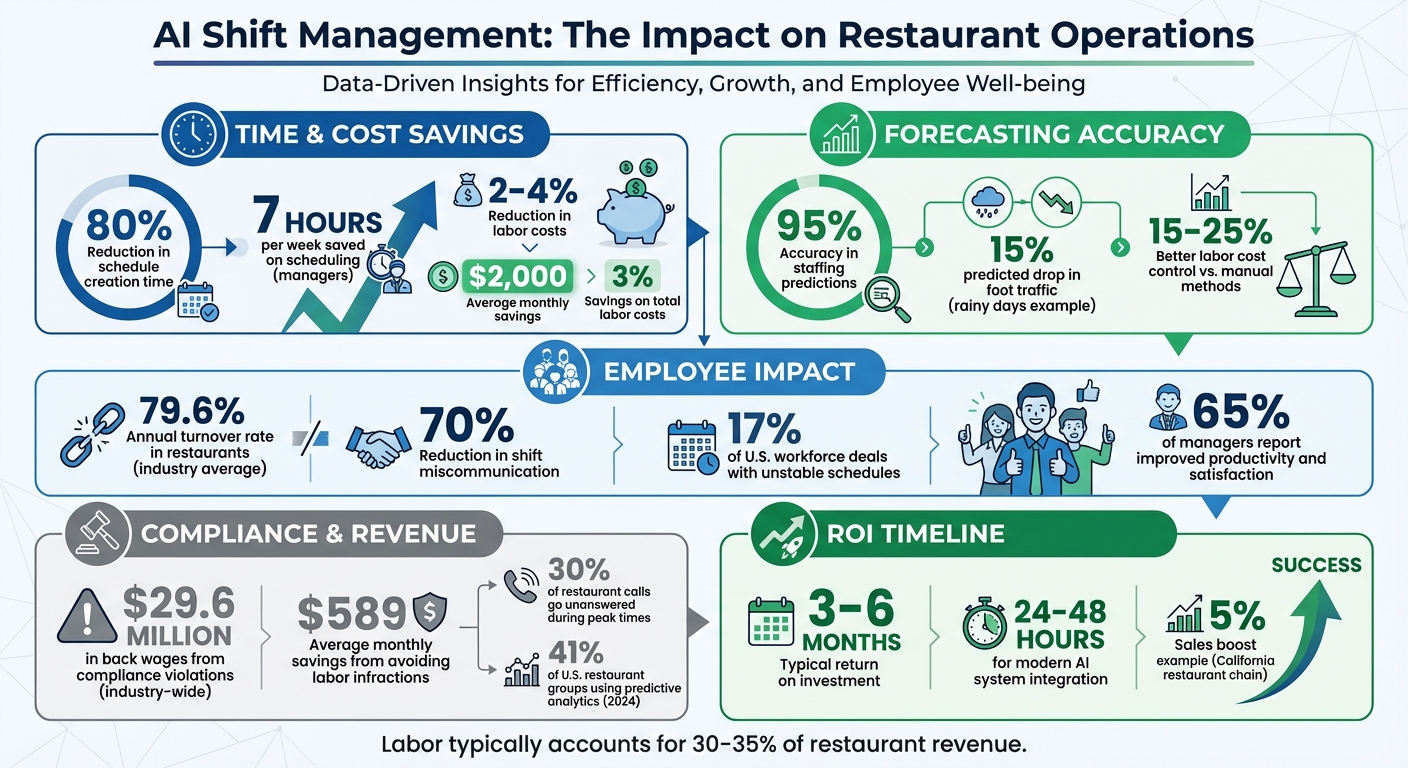
AI Shift Management ROI: Key Statistics for Restaurants
AI shift scheduling brings a host of advantages: it trims labor costs, improves employee satisfaction, and raises the bar for customer service. By replacing guesswork with data-driven decisions, these systems create schedules that respond to real-world conditions in just minutes.
With AI, managers can save up to 7 hours a week, translating into noticeable labor cost reductions by aligning staffing levels with actual demand. Restaurants using AI scheduling tools report saving up to 3% on total labor costs - a significant figure when labor accounts for 30–35% of overall expenses in the restaurant industry. For many establishments, this adds up to savings of about $2,000 per month.
How does AI do it? The system crunches data like historical sales, weather patterns, and local events to forecast staffing needs. For example, it might predict a 15% drop in foot traffic on a rainy Tuesday based on past trends. This level of precision replaces gut instincts with actionable insights.
Real-time integration with point-of-sale (POS) systems takes things further. The AI monitors labor costs in real time and alerts managers if sales fall below projections, suggesting adjustments to staffing levels on the spot. And if an employee calls out, the system quickly identifies the best replacement by factoring in skills, location, and labor cost impact. This dynamic approach prevents overstaffing during slow periods and avoids lost revenue from understaffing during busy times.
These operational efficiencies also contribute to happier employees, which is the next big win.
High turnover has long plagued the restaurant industry, with an average 79.6% annual turnover rate over the past decade. Unpredictable schedules are a major culprit. AI scheduling addresses this by posting shifts two weeks in advance, giving employees more control over their work-life balance.
"The inability to offer schedule flexibility was managers' biggest challenge in retaining employees last year, outside of pay." - Legion's 2024 State of the Hourly Workforce Report
Self-service tools allow staff to update their availability, request time off, or swap shifts instantly - no manager approval needed. The system also flags potential burnout risks, such as back-to-back "clopening" shifts (closing late and opening early) or long consecutive shifts, and suggests alternative rotations. By basing shifts on criteria like seniority and performance, AI eliminates perceptions of favoritism in assigning high-tip or prime shifts. Plus, digital records of requests and approvals foster transparency and trust. Research shows that having control over work schedules improves psychological well-being, which, in turn, boosts productivity and job satisfaction.
When employees feel supported, they perform better, and that directly impacts the customer experience.
AI ensures the right number of servers, cooks, and hosts are present for every shift, preventing understaffing - a common cause of slow ticket times, fewer table turns, and frustrated guests. By analyzing historical sales data, local events, and even weather, the system can anticipate peak periods and adjust staffing as needed. If unexpected callouts occur, AI adapts instantly to maintain service levels.
"Managing a restaurant is like conducting a symphony - every shift, every employee, and every table must work in harmony." - Marlaina Lanese
AI also assigns experienced staff during busy times, ensuring smooth and efficient service. Meanwhile, managers, freed from time-consuming administrative tasks, can focus on coaching employees and addressing guest concerns directly. This hands-on leadership enhances the dining experience and keeps operations running smoothly.
AI shift management systems combine data analysis, automation, and real-time monitoring to build flexible staff schedules. These systems pull information from sources like POS systems, reservation logs, weather forecasts, and event calendars to create rosters that adapt to changing needs. The process typically unfolds in three phases: forecasting demand, generating schedules, and adjusting in real-time.
AI systems analyze historical POS data to identify customer traffic patterns, such as peak hours, high-sales days, or seasonal fluctuations. By factoring in weather conditions and local events, these systems predict staffing needs with up to 95% accuracy, often looking up to three weeks ahead. For instance, AI might recognize that rainy days lead to a 15% drop in foot traffic or that a nearby concert boosts customer flow. These insights, powered by machine learning, highlight correlations that might escape human managers, allowing for precise staffing recommendations. This includes determining how many line cooks, servers, or hosts are needed for each shift.
As of 2024, 41% of U.S. restaurant groups were already using predictive analytics for scheduling and sales forecasting. This approach not only enhances accuracy but also helps restaurants manage labor costs more effectively, achieving 15% to 25% better control compared to manual methods.
Once the system forecasts demand, it uses optimization algorithms to create schedules quickly and efficiently. It accounts for variables like employee availability, certifications, performance metrics, labor budgets, and compliance with labor laws, including rules on overtime and meal breaks. For example, the AI might assign experienced servers to busy dinner shifts while scheduling newer employees for quieter times, giving them space to learn.
The system also ensures fairness by rotating desirable shifts based on factors like seniority and performance, reducing favoritism. Automation significantly cuts down the time managers spend on scheduling, while integration with POS and payroll systems ensures accurate wage calculations and overtime tracking. This streamlined process supports both cost savings and improved service quality.
When unexpected events occur - like an employee calling in sick, sudden weather changes, or a surge in walk-in customers - AI systems adapt instantly. The technology scans available staff to find qualified replacements, considering factors such as proximity to the restaurant, skill level, and current hours worked to avoid overtime. Some systems even allow employees to report absences or request shift swaps through voice AI, updating schedules automatically without manager involvement.
Throughout each shift, the AI monitors live data. If reservation numbers spike or walk-in traffic exceeds expectations, the system flags the need for additional staff to maintain service quality. During slower periods, it suggests sending employees home early to control labor costs while still meeting service standards. Real-time alerts also help managers address compliance issues, like missed breaks or minor work-hour violations, before they result in penalties. This proactive approach has reduced shift miscommunication by 70% and lowered labor costs by 2 to 4 percentage points.
"The real thing operators need are proactive alerts and easy to monitor schedule deviations that lead to labor projections that hit or surpass labor targets." - ByteShift
When choosing an AI shift management tool, it's essential to focus on features that address scheduling challenges directly. The ideal platform should handle scheduling efficiently, ensure compliance with labor laws, and offer flexibility for your team. Here’s a closer look at the most important features to consider.
A reliable AI tool should analyze data from various sources to forecast staffing needs with precision. This includes examining historical POS data, sales trends, and service mix, alongside external factors like weather and local events. The most effective systems break these predictions into dayparts - morning prep, lunch rush, dinner service - so you can allocate the right number of staff, such as line cooks, servers, and hosts, for every shift.
The tool should create draft schedules based on staff availability, skill sets, and labor budgets, making it easier for managers to approve schedules quickly. Beyond that, it must provide real-time alerts for potential compliance issues, such as overtime risks, clopen shifts, minor labor restrictions, and Fair Workweek violations.
This is critical because penalties for predictive scheduling violations in cities like New York can range from $10 to $75 per shift change, and compliance violations have collectively cost restaurants about $29.6 million in back wages. On average, restaurants using compliance tools save $589 per month by avoiding labor infractions.
"A centralizing scheduling platform is very useful, because it will help an employer to create schedules in a more orderly fashion... and help ensure that the employer complies with the applicable notice requirements."
- Davis Azrin, Partner at Gallet Dreyer & Berkey
Additionally, these tools simplify communication between managers and employees, making day-to-day operations smoother.
Look for a tool with user-friendly mobile features that allow employees to swap shifts easily, with automated digital approval trails. Top platforms also let employees electronically sign waivers for shift changes, ensuring there’s a digital record showing the change was initiated by the employee. This feature is especially important given that roughly 17% of the U.S. workforce deals with unstable shift schedules regularly.
The best tools include real-time dashboards that compare scheduled versus actual labor hours and highlight labor cost variances. Advanced systems even use Kitchen Display System ticket times to pinpoint bottlenecks and suggest labor adjustments to maintain service speed.
"The live data allows me to check on stores in real time to see who's clocked in, sales, labor, and alerts for people approaching overtime."
- David Doyle, Area Director, The Greene Turtle
Start by taking a close look at your current scheduling process. How much time does your management team spend on creating schedules? The industry average is around 6 hours per week - if you're clocking more than that, your process might be wasting valuable resources.
Next, dig into labor variances. This means comparing the hours you planned against the hours actually worked. Look for patterns like early clock-ins, late clock-outs, or frequent "clopen" shifts (when someone closes and opens back-to-back). These issues can lead to compliance risks and burnout for your team. It's also worth tracking compliance risks like overtime or missed breaks, as these can turn into costly problems.
"If your team can't predict what the week looks like, you're not leading - you're reacting."
- Gavin Kaysen, Spoon & Stable
Once you've identified the pain points, it's time to connect an AI tool to streamline your scheduling process.
To get started, integrate your AI tool with your POS system. This involves syncing sales, labor, and employee data through secure API connections (using OAuth) to ensure the data stays accurate in real time. Depending on how busy your restaurant is, the system updates every 5–15 minutes.
Before diving in, check your POS subscription. Some plans don’t include API access, and without it, you may need to use an additional time-clocking app that works with your AI system.
Once connected, set up overtime rules that comply with your local labor laws. You can also configure grace periods - usually 5–10 minutes - to allow employees a buffer for clocking in. The good news? Modern AI systems can integrate in as little as 24–48 hours, compared to months in the past.
With your system up and running, the next step is training your team to use it effectively.
Start small - roll out the AI system in just one department or location before expanding it across your entire business. Use mobile-friendly training tools so employees can easily access tutorials and scheduling features on their phones. To build trust, explain how the AI makes scheduling decisions.
"If you don't have a system, you're training on vibes."
- Annie Eisemann, HopDov
Pair new users with a mentor who can help them navigate the app and handle tasks like swapping shifts. Train managers to interpret AI recommendations and give constructive feedback using a "praise and redirect" method: highlight one thing an employee is doing well and one area that needs improvement.
Once the system is in place, track key metrics like labor cost percentage (which should decrease by 2–4 points), management time savings (5–10 hours per week), compliance violations, and employee turnover rates. Most restaurants see a return on investment within 3–6 months. Review the system's forecasting accuracy weekly and make adjustments based on feedback to fine-tune operations and improve employee satisfaction.
Bytes AI’s phone assistant takes the pressure off busy restaurant teams by answering every incoming call instantly. Whether it’s during a packed dinner rush or a quiet afternoon, the AI ensures no call goes unanswered, letting staff stay focused on the floor. It’s multilingual too, handling orders in over ten languages like English, Spanish, Arabic, Hindi, and Chinese. Even better, it syncs seamlessly with your POS system - whether you’re using Clover, Square, Toast, or NCR - so orders are automatically logged, cutting out manual entry.
Did you know that up to 30% of restaurant calls go unanswered during peak times? That’s a lot of missed revenue. Bytes AI steps in to capture those calls. For example, Taha A. from House of Wings shared that over a single month, the AI managed about 300 calls, turning over 150 into orders and generating more than $5,000 in extra revenue. Before using Bytes, the restaurant had gone two years without a dedicated phone system. Another restaurant saved 58 staff hours in a month by having the AI handle calls, making leaner scheduling possible.
"Fridays used to stress me out. The phone would ring nonstop during dinner rush and we'd definitely lose orders. Since we added Bytes, every call gets picked up immediately."
- Adel A., Aramex Restaurant
Beyond just answering calls, the AI remembers repeat customers, including their past orders and any allergies. It even suggests high-margin add-ons automatically. This means your team can focus on what they do best - serving guests and keeping the kitchen running smoothly. By managing calls so effectively, Bytes AI helps restaurants bridge staffing gaps during peak hours without compromising service.
Bytes AI is constantly evolving to simplify restaurant operations even further. Soon, it will offer automated reservation booking. This feature will collect party size, time, and contact details instantly, feeding the information into your scheduling system. The result? More accurate forecasting and staffing that matches demand - no more overstaffing or scrambling for last-minute coverage.
The upcoming Bytes POS will also include real-time dashboards that display performance metrics at a glance, helping managers make quick adjustments during shifts. Another exciting addition is menu inquiry handling. The AI will answer customer questions about ingredients, dietary restrictions, and modifiers, saving your staff time and improving the guest experience.
When these AI tools integrate sales data, reservation trends, and phone order activity with your POS, creating schedules becomes a breeze. You’ll be able to generate detailed, dynamic shift plans in minutes and adjust them on the fly based on what’s happening in real time. By combining advanced call management with synced POS insights, Bytes AI helps restaurants run smarter, more efficient operations tailored to actual customer demand.
AI shift management offers a practical way to cut labor costs, reduce turnover, and enhance service quality. For example, AI scheduling can trim labor expenses by up to 15%, slash schedule creation time by 80%, and decrease labor cost percentages by 2–4 points. Considering that labor typically accounts for 30–35% of revenue, these savings can directly impact your bottom line. By creating fair and predictable schedules, AI also helps address the hospitality industry’s staggering 79.6% turnover rate. It eliminates scheduling bias and gives employees more control over their hours. Plus, with automated scheduling, managers can shift their focus to coaching their teams and improving the guest experience. When paired with Bytes AI tools, this technology makes operations even smoother, keeping your team focused on delivering top-notch service.
The move to AI-powered operations is about working smarter, not harder. For instance, a California restaurant chain saw a 5% boost in sales by using AI to align staffing with predicted customer demand. Additionally, 65% of restaurant managers report noticeable improvements in productivity and employee satisfaction after adopting AI solutions. These tools also help avoid compliance issues, which have previously cost the industry $29.6 million in back wages.
"AI isn't about taking the human touch out of hospitality - it's about making that human touch easier to deliver." - Larry Struckman, Founder, ShiftNote
Whether it’s dealing with fluctuating customer traffic, high turnover, or lost revenue from missed calls, AI solutions like Bytes AI provide a straightforward way forward. By automating tasks like demand forecasting, schedule creation, and phone answering, your team can focus on what matters most - delivering unforgettable experiences for every guest.
To create precise AI-driven staffing forecasts, start by gathering a variety of data points. This includes historical sales figures, customer demand trends, real-time operational data, and external influences like weather conditions, holidays, and local events. By funneling this information - ideally through your POS system - you enable AI to identify patterns, anticipate demand, and fine-tune staffing levels accordingly. Keeping this data centralized ensures the system stays responsive and accurate, even as conditions shift.
Integrating AI scheduling into your POS and payroll systems largely hinges on the platforms you're working with. Tools like Bytes AI simplify this process by offering compatible APIs or pre-built plugins. In many cases, the setup is straightforward and can be completed in just a few days - or even hours - thanks to clear, step-by-step instructions. This makes it an accessible solution for most restaurant owners looking to streamline their operations.
To introduce AI scheduling effectively, start by explaining its advantages to your team. Highlight how it can ease workloads, create better schedules, and promote equity. Roll it out in stages to give everyone time to adjust, and ensure the process combines AI recommendations with human oversight to maintain fairness and meet compliance standards. Be transparent about any concerns, reassuring staff that AI is there to assist, not replace, their efforts. Lastly, offer training and continued support to encourage a smooth transition and build trust in the system.