
Restaurant Technology
Published March 17, 2026
How to connect order aggregators to your POS: check compatibility, set up APIs, train staff, test flows, and reduce errors and manual entry.

Managing orders from multiple delivery platforms like DoorDash, Uber Eats, and Grubhub can be overwhelming. Integrating your order aggregator with your POS system solves this problem by consolidating all orders into one system, reducing errors, and improving efficiency.
Here’s why this matters:
To get started:
Key benefits include:
Bytes AI is a platform that simplifies this process, offering centralized order management and integration with major delivery services. Their plans start at $259.99/month, with features like menu syncing and custom-branded apps. Testing and monitoring your setup is essential for smooth operations, ensuring orders sync correctly and your team can handle peak times without disruptions.
Integrating your systems creates a more organized, efficient workflow, allowing your team to focus on what’s most important: delivering great food and excellent service.
Integrating your order aggregation system with your POS creates a streamlined, unified platform for managing orders. Whether customers place orders through DoorDash, your website, or your app, all the details flow into one consistent system. For kitchen staff, this means all orders are displayed in a uniform format, simplifying workflows and reducing stress during peak hours.
This integration also simplifies menu updates. Make a change in one place, and it automatically syncs across all platforms. This eliminates issues like selling out-of-stock items or processing refunds for unavailable dishes. By centralizing everything, you reduce operational headaches and cut down on errors caused by manual updates.
Manually entering orders leaves plenty of room for mistakes. In fact, 57% of restaurants report that inefficiencies and errors from manual transcription are a major pain point. With an integrated system, orders are sent directly from the aggregator to your kitchen printer or POS screen, eliminating the need for manual re-entry.
The results speak for themselves: integrating order aggregation with top POS systems can reduce order errors by as much as 99%. This translates to fewer remakes, less wasted food, and lower refund costs. It also frees up your team to focus on preparing meals correctly the first time, which naturally leads to better service.
Fast, accurate order processing is key to keeping customers happy. When online orders flow seamlessly into your POS, your team spends less time on administrative tasks and more time focusing on food quality and guest interactions. Tyler Medina, Head of Marketing at Backyard Butchers, highlights this benefit:
"Customer support has improved because now that everything's integrated in the same system, we can see orders so much faster. We can pull customer data so much faster, so our response times have shortened."
An integrated system also builds unified customer profiles, combining online and in-store purchase histories. This means your staff can offer more personalized service, whether it’s recognizing a regular customer’s favorite dish or tailoring promotions to their preferences. With 52% of consumers now viewing restaurant takeout as a staple in their lifestyle, meeting expectations for speed and accuracy is no longer optional - it’s what keeps them loyal. These advantages pave the way for a smoother integration process, which will be discussed in the next section.
Preparation is key when it comes to integrating your systems. Rushing the process can lead to syncing errors, missed orders, and frustrated employees. To avoid these headaches, take the time to ensure compatibility and equip your team with the knowledge they need. Start by confirming that your POS system works with your chosen order aggregation platform.
Not every POS system works effortlessly with all order aggregation platforms. To check, log into your delivery platform’s merchant portal (like DoorDash), navigate to Settings > Integrations, and look for your POS provider. Many platforms have a list of Preferred Integration Partners - such as Toast, Square, Revel, and Lightspeed - that are known for stable connections.
If your POS system is older or custom-built and lacks a built-in integration, don’t worry. Middleware providers like Deliverect, ItsaCheckmate, or Otter can often bridge the gap. Alternatively, reach out to your POS vendor to see if they support API-based integrations with delivery services. Once compatibility is confirmed, activating the integration typically takes about three days. At this point, you’ll also need to secure API access and ensure your internet connection is up to the task.
For your POS system to communicate with platforms like DoorDash or Uber Eats in real time, it must have open API access. Without this, orders won’t sync automatically, which defeats the purpose of integration. Confirm with your POS vendor that your system supports APIs or webhook-based updates for seamless syncing.
Equally important is a reliable internet connection. If your network goes down or lags, you could miss orders or see prep times become inaccurate. To prepare for potential outages, keep a backup tablet or access to the platform’s dashboard so you can manage orders manually during busy periods.
Even the best integration will fall short without properly trained staff. While onboarding and training may cost between $300 and $800, it’s a worthwhile investment. Training should cover navigating the interface, managing order flows, monitoring alerts for failed syncs, and rerouting orders manually during outages.
Once the technical setup is complete, well-trained employees will ensure everything runs smoothly. Create simple Standard Operating Procedures (SOPs) and visual guides to help your team adapt to the new workflow. Start small by integrating with one or two delivery apps to make the transition less overwhelming.
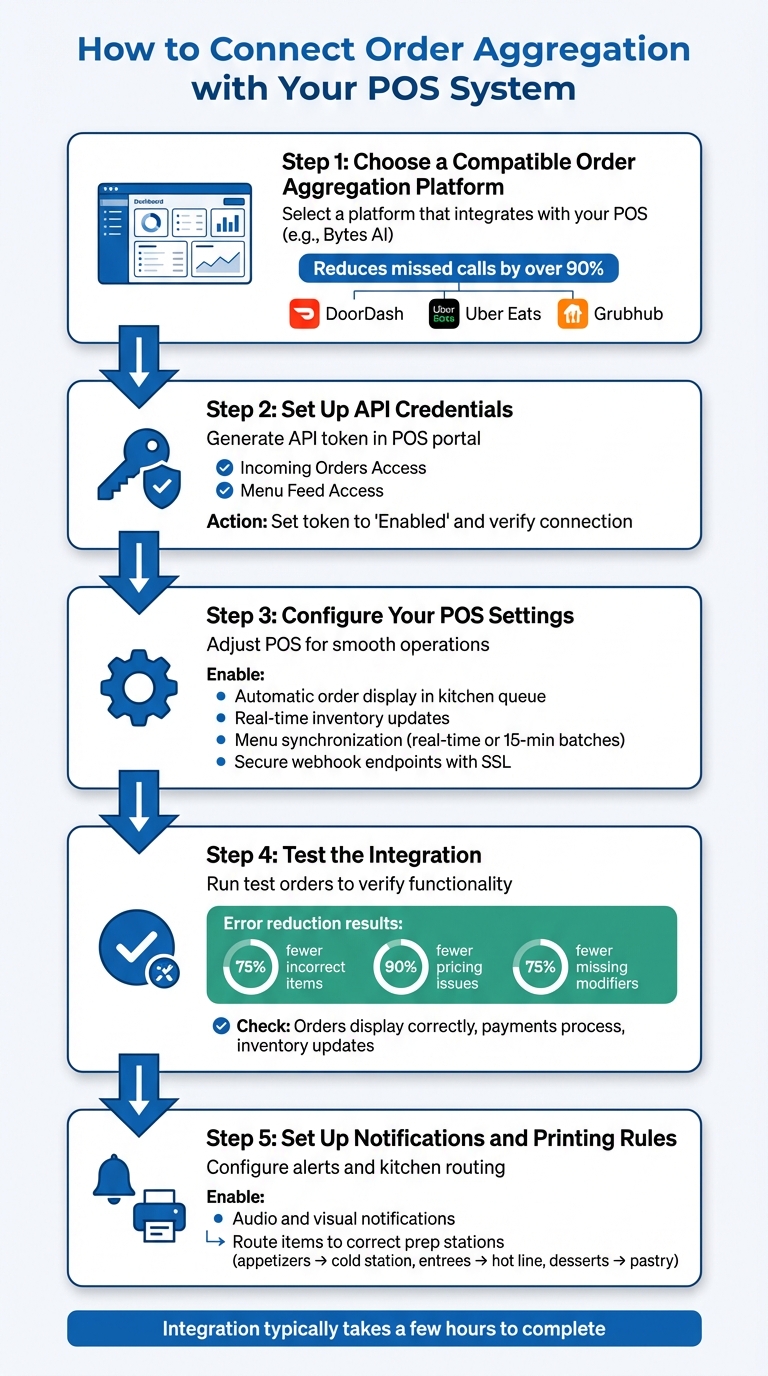
5-Step Guide to Integrating Order Aggregation with POS Systems
Once your systems are compatible and your team is trained, it’s time to connect them. This involves setting up secure access, configuring how orders are routed to your kitchen, and running tests to make sure everything works smoothly. In many cases, the integration process can be completed in just a few hours.
Here’s a step-by-step guide to help you integrate your order aggregator with your POS system.
Start by selecting an order aggregation platform that works well with your existing POS system and streamlines your operations. For example, Bytes AI integrates directly with your POS, reducing missed calls by over 90%. It connects with popular delivery services like DoorDash, Uber Eats, and Grubhub, so you don’t have to manage multiple devices or manually input orders during peak times. This ensures you never miss an opportunity to capture revenue.
To link your aggregation platform with your POS, you’ll need API credentials. Here’s how to get started:
With API access established, adjust your POS settings to ensure smooth operations:
Once these settings are in place, it’s time to test the system.
Testing is critical to ensure everything functions as expected. Begin with simple test orders, like a single-item purchase, to identify any initial issues. Then, move on to more complex orders with multiple modifiers and special instructions.
Check that:
Monitor webhook endpoints to confirm they’re receiving order.created and order.updated notifications. If issues arise, review error logs in both your aggregator and POS dashboards to pinpoint the problem. Studies show that integrated systems can reduce errors such as incorrect items by 75%, pricing issues by 90%, and missing modifiers by 75% compared to manual entry.
Finally, configure how your team receives order alerts and how tickets print in the kitchen. Enable both audio and visual notifications for new orders. Define printing rules to route items to the right prep stations - for example, appetizers to the cold station, entrees to the hot line, and desserts to the pastry section. This ensures each station only sees the orders they need, minimizing confusion and speeding up service. Test these rules with sample orders to confirm they’re working properly before going live.
Bytes AI simplifies restaurant operations by combining order aggregation and POS integration into a single platform. With Bytes AI, you can manage all orders through one dashboard. It connects seamlessly with major delivery services like DoorDash, Uber Eats, and Grubhub, automatically routing orders to your existing POS system.
When an order comes in from a delivery platform, Bytes AI takes care of it automatically. It confirms the order and sends the details straight to your POS system, eliminating errors and speeding up kitchen prep. Orders are displayed on your kitchen screens or printed based on your preset rules, so your team can start cooking right away - no need to juggle multiple devices. Plus, Bytes AI is constantly expanding its features to meet restaurant needs.
Bytes AI is also working on a next-generation POS system tailored for modern restaurants. The Bytes POS will offer features like a real-time sales dashboard to monitor daily performance, multi-payment processing for credit cards, mobile wallets, and contactless payments, and built-in customer loyalty program support. This POS system will integrate perfectly with Bytes AI’s order aggregation tools, making it a comprehensive solution for restaurant management.
Bytes AI provides two pricing plans designed to meet different needs. The Web & App plan costs $259.99/month and includes centralized order aggregation, POS integration, menu syncing, and custom-branded websites and mobile apps. For an additional $20, the AI Phone Assistants plan at $279.99/month adds AI-powered phone order-taking and booking capabilities, ensuring phone orders are seamlessly integrated into the system. Both plans aim to simplify and streamline restaurant operations.
| Bytes AI Plan | Monthly Price | Key Features |
|---|---|---|
| Web & App | $259.99 | Centralized order aggregation, POS integration, menu sync, custom-branded sites/apps |
| AI Phone Assistants | $279.99 | All Web & App features plus AI phone order-taking and booking capabilities |
Once your API credentials and POS settings are in place, it's time to ensure everything works as intended. Testing is crucial to confirm that your system can handle real-world scenarios without hiccups. After going live, focus on edge cases like failed payments, complex modifiers, and cancellations. For example, place test orders with special instructions, substitutions, and add-ons to ensure modifiers are correctly linked to menu items - not listed as separate charges. Check that orders show up immediately on kitchen screens and verify that out-of-stock items are updated across all platforms. To keep things running smoothly, schedule menu syncs every 15 minutes during service hours.
Dealing with cancellations and refunds effectively requires tight coordination between your POS system and your order aggregation platform. When an order is canceled, make sure that the cancellation is logged in both systems to avoid unnecessary food preparation. During busy times, failed payments can sometimes lead to double charges, so staff training on how to handle these situations is essential. Set up automated alerts for issues like sync failures or failed API calls to ensure quick responses. Also, update your API keys every quarter and switch to OAuth 2.0 authentication to reduce the risk of connection drops that could disrupt order flow. Once these processes are in place, use the data gathered to refine and improve your operations.
Your integration platform's analytics can reveal where delays occur and where staff might need extra support. For instance, daily reports can highlight patterns, like orders failing at specific times, which could point to rate limiting during peak hours or problems with webhook configurations. Track metrics such as processing times and sync error rates to identify bottlenecks. Before rolling out changes across all locations, consider running a four- to six-week pilot at one or two sites to address any issues early. For multi-location restaurants, analytics can also ensure that orders are routed correctly based on store identifiers and geographic rules, helping customers pick up their orders at the right location without confusion.
Connecting order aggregation with your POS system requires careful preparation, the right tools, and ongoing fine-tuning. Start by ensuring your POS system is compatible, establishing a reliable internet connection, and training your team. These steps help avoid complications and set the stage for a smooth transition.
Choosing the right platform is just as important. Bytes AI simplifies order management by centralizing everything, so you no longer have to juggle multiple devices or manually input orders. Plus, with the upcoming Bytes POS system, you'll gain access to a fully integrated solution tailored to modern restaurant needs. Features like real-time sales tracking and multi-payment processing will streamline your operations even further.
Once your systems are integrated, keep a close eye on performance. Test order flows regularly, watch for sync issues, and use analytics to spot and resolve any bottlenecks during busy times. For smoother updates, consider piloting changes in select locations and double-checking your API credentials before rolling out changes system-wide. These proactive measures help maintain efficiency and ensure a consistently high level of service.
At its core, integration is about more than just connecting systems - it's about building an operation that’s smooth, efficient, and customer-focused. With fewer errors, faster service, and more time for your team to engage with guests, your integrated system becomes a game-changer, driving both efficiency and growth for your restaurant.
Integrating order aggregation with your POS system brings all your orders - whether they come from in-house dining, delivery apps, or online platforms - into a single dashboard. This setup simplifies the process, cutting down on manual entry mistakes and automatically directing orders to the appropriate kitchen stations. The result? A smoother, more efficient workflow.
That said, your team might need some time to get used to the updated processes. Additionally, kitchen stations may need slight adjustments to handle the automated order flow effectively. These changes are designed to help your kitchen run more efficiently, especially during busy periods.
If your internet connection drops, cloud-based POS systems with order aggregation capabilities can still function locally, allowing you to keep processing orders without interruptions. These modern systems are designed to update orders and inventory during downtime, ensuring operations continue seamlessly until you're back online. That said, some systems might face delays syncing with online platforms once connectivity is restored. To minimize potential hiccups, make sure your POS system supports offline functionality and always have a backup plan ready.
To handle cancellations and refunds effectively after syncing, start by using your POS system to process cancellations. This ensures that updates are synchronized across all connected platforms. For refunds, rely on your payment gateway or online ordering platform, carefully following their specific instructions. Always confirm that order statuses update in real-time to avoid confusion, and if your system supports automated messaging, notify customers promptly. These practices help keep operations smooth and enhance customer experience.