
Restaurant Technology
Published February 22, 2026
Consolidate orders, sync menus, link POS, and automate notifications to cut errors, save labor, and increase restaurant revenue.

Customizing order management software can help restaurants simplify operations, reduce errors, and increase revenue. Instead of juggling multiple devices for orders from delivery apps, phone calls, and walk-ins, a tailored system consolidates everything into one dashboard. This reduces manual data entry, improves order accuracy, and helps handle complex requests like ingredient substitutions. Restaurants using customized systems have reported benefits such as a 22% revenue boost from answered calls and 10–20% labor cost savings through automation.
By addressing inefficiencies and integrating all order channels, restaurants can improve customer satisfaction, reduce errors, and scale operations effectively.
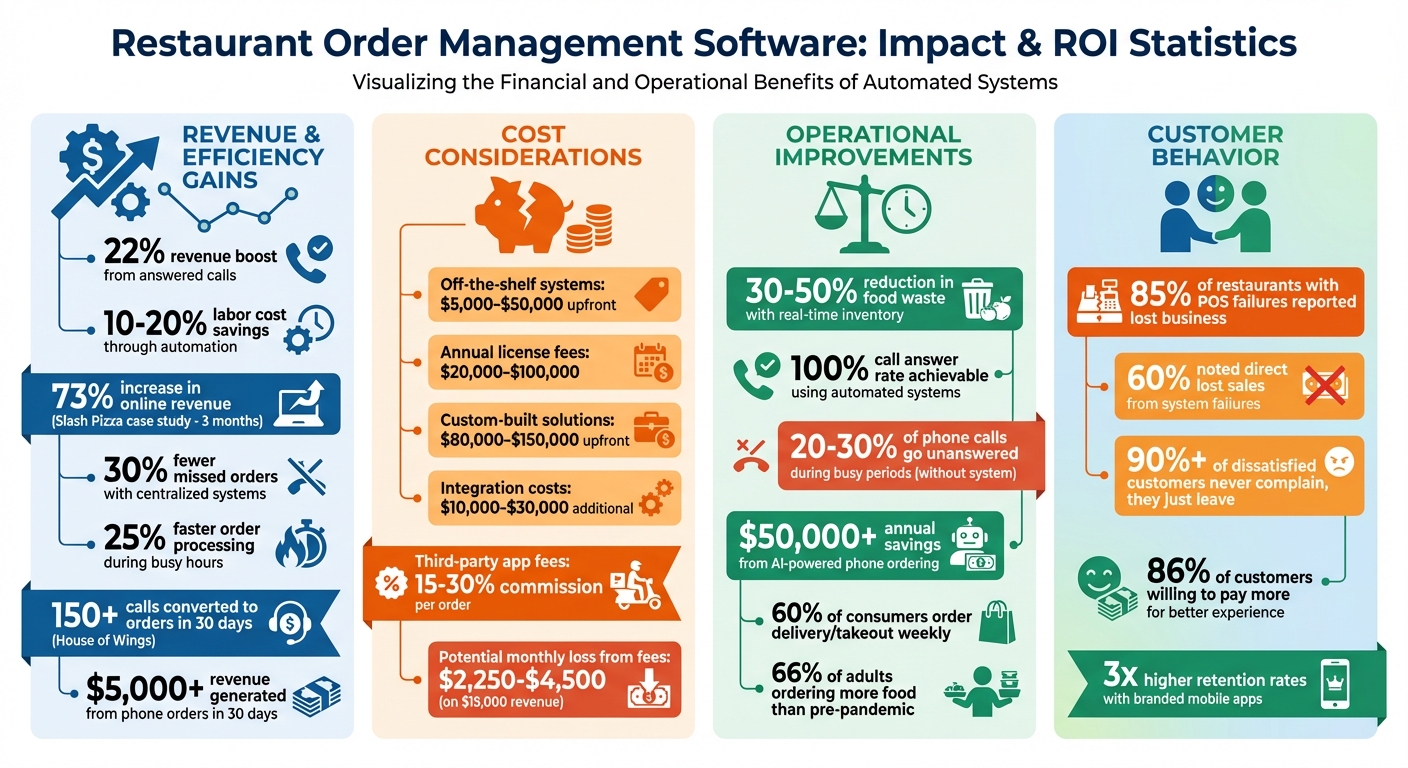
Restaurant Order Management Software ROI: Key Statistics and Cost Savings
Before diving into software customization, take a moment to map out your current order process. Many restaurant operators skip this step, rushing to add features, only to find their new system doesn’t address the root issues. Start by identifying where orders come from and pinpointing the pain points: Are your staff overwhelmed by multiple tablets during peak hours? Are phone orders being misheard or written down wrong? Are tickets poorly timed across different platforms?
Translate these problems into dollar terms. For example, if your restaurant generates $15,000 monthly through third-party apps, you’re losing $2,250–$4,500 in fees right off the bat. Add to that the 20–30% of phone calls that might go unanswered during busy periods, and you’re potentially losing thousands more. Considering that 60% of consumers order delivery or takeout weekly, every missed call or error adds up fast. Once you’ve tracked these issues, list out all your order channels and the specific challenges tied to each one.
Start by listing all your order sources: dine-in, phone orders, your restaurant’s website, and platforms like DoorDash, Uber Eats, and Grubhub. Then, dig into what goes wrong with each. For instance, manual re-entry errors - like typos or missed customizations - are common when staff have to transfer orders from tablets to your POS system. Menu inconsistencies can also cause headaches, especially when you can’t instantly mark an item as sold out across all platforms. This leads to canceled orders, refunds, and frustrated customers.
Take Slash Pizza in Glendale, California, as an example. They struggled with managing orders across DoorDash, Uber Eats, and Grubhub. After consolidating these platforms into a single interface using Orders.co, they saw a 73% increase in online revenue within just three months. The key wasn’t adding flashy new features - it was solving the fragmentation problem.
"The biggest operational pain usually isn't volume, it's fragmentation. When tickets live across different tablets and systems, small issues compound fast." – Zoe Ovenden, Author
Next, calculate the cost of each issue. Compare third-party commission fees, lost phone sales, and the time your staff spends fixing errors or re-entering orders. This will help you prioritize where customization can have the most impact. Track how much time your team spends on non-service tasks like managing tablets or correcting mistakes. Use this data to set clear goals for addressing your workflow bottlenecks.
Once you’ve identified the key challenges, focus on creating specific, measurable objectives to tackle them. Avoid vague goals like “improve efficiency.” Instead, aim for results like achieving a 100% call answer rate to recover lost revenue, cutting food waste by 30–50% with real-time inventory tracking, or eliminating manual entry errors by integrating directly with your POS system.
For instance, SMILEFOOD introduced a custom order management system in September 2025 to handle ingredient-level customizations. This allowed customers to exclude specific ingredients, reducing errors and helping the kitchen process complex orders more effectively. By addressing a specific issue - ingredient modifications being missed or entered incorrectly - they created a solution tailored to their needs.
Your objectives should reflect the way your restaurant operates. If you have unique workflows, like custom pricing rules or specialized routing logic, make sure to document them. These processes are part of what sets your restaurant apart, so don’t let a generic system force you to compromise. Talk to your kitchen and front-of-house teams to uncover what slows them down during busy shifts.
It’s also important to map out peak order times and staff availability. If your phone lines are constantly tied up during lunch and dinner rushes, consider an AI-powered phone assistant as a key priority. Restaurants that ensure every call is answered can see up to 22% higher revenue. Tailor your system to meet role-specific needs too: managers may want simplified dashboards, kitchen staff need clear and organized tickets, and delivery coordinators rely on real-time tracking.
After mapping out your requirements, the next step is selecting a platform that fits your restaurant’s specific workflow - without forcing you to change how you operate. The wrong choice can leave you stuck with rigid systems that limit your options, while the right platform provides control over menus, integrations, branding, and user permissions, with flexibility to grow.
Off-the-shelf systems typically cost between $5,000–$50,000 for initial setup, with annual license fees ranging from $20,000–$100,000. On the other hand, custom-built solutions often start at $80,000–$150,000 upfront but offer greater flexibility and ownership. For many restaurants, the sweet spot is a customizable third-party platform - a balance of cost and tailored features without the need to build from scratch.
Be cautious of proprietary lock-in. Systems tied to a vendor’s hardware or those that don’t integrate with common third-party tools can create unnecessary challenges. Before committing, test the platform for two to four weeks under real-world conditions to ensure it meets your needs. Additionally, clarify which integrations are included in the base price and which require extra fees - these can add $10,000–$30,000 to your costs.
Once you’ve outlined your needs, focus on platforms that combine centralized control with flexibility. The right system should handle your core operations without requiring you to piece together multiple tools. Start by ensuring it provides centralized order aggregation - a single queue that pulls in orders from your website, app, QR codes, kiosks, and platforms like DoorDash, all in one place. This simplifies order management, especially during peak hours.
Another must-have is a unified menu system. Updates to menu items should sync instantly across all channels, ensuring availability changes are reflected everywhere without delay. Be sure to test this during platform demos.
Deep integration capabilities are equally important. The platform should connect smoothly with your POS system, payment gateways, and delivery services without requiring manual workarounds. For instance, Bytes AI integrates with major online ordering platforms, consolidating orders from multiple sources. If you manage multiple locations, look for store-level flexibility, allowing each site to independently configure POS systems, payment options, and loyalty programs.
Additionally, white-label customization is key to maintaining your brand identity. The platform should allow you to use custom logos, colors, fonts, and photos, ensuring a consistent customer experience. Restaurants with branded mobile apps often see retention rates up to three times higher, along with more repeat orders.
Lastly, ensure you retain full ownership of customer data, including order histories and preferences. This data is crucial for effective marketing and analytics.
Beyond immediate needs, consider how the platform can grow with your business over the next few years. Evaluate options with a 3–5 year outlook in mind. Many restaurants are turning to cloud-based systems, which make up 78% of new deployments. These systems offer lower overall costs, automatic updates, and easy access across multiple locations.
Look for platforms that support emerging technologies. For example, AI-powered phone ordering can handle unlimited calls simultaneously, eliminate transcription errors, and save over $50,000 annually by reducing missed calls and labor costs. Bytes AI is already developing features like automated reservation booking, menu inquiries, and a modern POS system tailored for restaurants.
A robust API is another critical feature, allowing you to integrate future tools or custom-built features as your needs evolve. Also, avoid percentage-based transaction fees when scaling. For instance, a restaurant processing $30,000 monthly might pay $900/month with a 3% fee, compared to flat subscription fees (typically $89–$200/month) that remain stable regardless of volume.
One example of effective customization comes from SMILEFOOD, which in September 2025 implemented a custom order management system. This system integrated ingredient-level customization into the kitchen workflow, reducing order errors and syncing real-time inventory availability. Such tailored solutions are achievable when you choose a platform designed to adapt as your restaurant grows.
Once you've chosen your platform, the next step is tailoring it to fit your restaurant's daily workflow. Start by configuring the system based on your identified needs and specific goals. This means setting up menus with accurate pricing and availability, linking external systems to avoid repetitive manual tasks, and automating customer updates. These foundational adjustments help streamline the entire ordering process.
Most platforms offer several ways to create menus. You can manually enter items, import them from platforms like Toast or DoorDash, upload a photo of your physical menu, or even use AI-generated templates. Define key order milestones - like "In Preparation", "Ready for Pickup", or "Out for Delivery" - to trigger automatic SMS or email updates. This saves your staff from manually updating customers and reduces calls asking about order status.
Building your digital menu requires careful planning to accommodate time-based availability (also called dayparting), channel-specific pricing, and optional add-ons. Organize your menu into pages (major sections like "Lunch" or "Dinner"), groups (categories like "Appetizers"), and individual items. Use menu hours to control when entire menus appear - for instance, breakfast might only display from 7:00 AM to 11:00 AM. For more precise control, set group-specific hours, like activating "Happy Hour" items only on weekdays from 4:00 PM to 6:00 PM.
Dual pricing is a smart way to handle third-party delivery commissions. For example, you might charge $10 for a burger on delivery apps but $7 for in-store pickup. This approach helps offset the 15%–30% commission fees charged by platforms like DoorDash and Uber Eats.
Modifiers are another key tool. Use required modifiers for choices like meat temperature or drink size, and optional ones for extras like avocado or bacon. Mark items as "Sold Out" in real time when ingredients run low to prevent orders for unavailable dishes. For seasonal updates, bulk edit tools make it easy to adjust prices, descriptions, or tax settings across multiple items at once. Keep menu groups (what customers see) separate from reporting categories (used for routing orders to kitchen stations and tracking sales data).
Once your menus are set, ensure seamless communication between your system and delivery or POS channels.
Integrate your third-party delivery accounts - like Uber Eats, DoorDash, and Grubhub - into a single dashboard. This consolidation eliminates the need for separate vendor accounts and ensures consistent pricing and menu details across all platforms. Import menus from each service and merge them into a unified version to address menu fragmentation issues.
Directly connect your software to your POS system or kitchen printers so orders flow automatically to the kitchen. Use a dedicated device (like an iPad) connected to a power source with the app running continuously to prevent missed orders. Enable the "Automatically accept" setting on your POS to send online orders directly to the kitchen without manual confirmation.
"Third-party delivery integration lets you view and manage all incoming orders in one place. It keeps your staff focused and helps you stay on top of orders without bouncing between devices." – Orders.co
Customize printer templates to include customer names and delivery details by enabling the "Show customer" option. If you want to limit online sales to specific items, create shortcut categories in your POS for easier menu syncing. Also, ensure your POS and order management software are set to the same time zone and daylight savings settings to avoid timing errors.
Real-time menu updates across multiple locations allow you to mark items as "Sold Out" instantly on all platforms, reducing customer complaints and refund requests due to unavailable items.
Define key order milestones, such as "Order Received", "In Preparation", "Ready for Pickup", and "Out for Delivery", to trigger automatic SMS or email updates. Map out your restaurant's workflow in detail so each milestone corresponds to a specific customer notification.
Integrate your notification system with your POS or Kitchen Display System (KDS). For instance, when a chef clears a ticket, the system can automatically notify the customer. This removes the need for manual updates and reduces order status inquiries, addressing a common communication bottleneck.
For more advanced customization, connect your order management software to platforms like Zapier, Make, or N8N. These tools let you automate tasks, such as sending promotional follow-ups or loyalty reminders a few days after an order is delivered.
When an order is marked as "Out for Delivery", the system can share details like estimated arrival times, driver information, and handoff instructions. A centralized dashboard ensures that every status change triggers the right update, no matter where the order originated - be it Uber Eats, DoorDash, or your own website.
Once you've added custom features, the next step is to thoroughly test them to ensure they fit smoothly into your restaurant's operations. Testing isn't just a formality - it's essential. As software testing professional Riazul Islam points out, "Malfunctions, crashes, and integration issues – these could all have been avoided with comprehensive POS testing beforehand". And the risks are real: 85% of restaurants that faced POS system failures reported losing business, with 60% noting lost sales as a direct result.
Start by simulating real-world scenarios, like a packed Friday night with over 50 orders coming in from all channels. This kind of stress test helps you see if your system can handle peak demand without lagging or losing orders. Ideally, your system should process orders in under 30 seconds from customer placement to POS confirmation.
Make sure to test every type of order - dine-in, takeout, delivery, and catering. Try out different payment methods and make modifications to orders to confirm everything is displayed and routed correctly. Simulating network failures is also important to check how well your software recovers and whether it preserves order data.
Go through end-to-end testing thoroughly. For example, create orders with specific instructions and confirm that inventory updates automatically after each sale. Plan to dedicate 8–16 hours to this process to ensure no detail is overlooked.
After completing these tests, it's essential to gather feedback from actual users to fine-tune the system.
Once testing is complete, focus on gathering insights from the people who use the system daily - your staff and customers. Staff feedback can highlight operational issues, such as delays during the lunch rush or errors with dietary modifications. Addressing these concerns could involve refining order-entry validation or simplifying checkout steps.
Customer feedback is just as critical. Studies show that over 90% of dissatisfied customers never voice their complaints - they simply stop coming back. To prevent this, proactively collect feedback. Send follow-up emails within 24 hours of an order while the experience is still fresh. Use simple tools like one-click ratings (thumbs up/down or star ratings) to make it easy for customers to respond. Personalize these messages by including their name and referencing their specific order.
This effort pays off. Data shows that 86% of customers are willing to spend more for a better experience, so every improvement you make can directly boost your revenue.
Customization is all about cutting out inefficiencies from your daily operations. For restaurants, this often means consolidating all order sources into one dashboard, syncing seamlessly with existing POS systems, and automating time-consuming tasks like menu updates and customer notifications.
This streamlined setup isn't just convenient - it delivers real results. Industry data reveals that restaurants using centralized systems see 30% fewer missed orders and 25% faster order processing during busy hours. On top of that, 66% of adults say they’re ordering food more often than they did before the pandemic.
If automation sounds like the missing piece for your business, Bytes AI might be the answer. Their AI-powered phone assistants handle every call, integrate directly with popular POS systems like Toast, Square, and Clover, and even remember customer preferences for quicker reorders. For example, House of Wings saw impressive results with Bytes AI, converting 150+ calls into orders in just 30 days, raking in over $5,000 in revenue. As Taha A. from House of Wings shared:
"We've been operating without a phone for two years - ever since Bytes AI. In the last 30 days alone, we received about 300 calls and over 150 converted into orders, generating over $5,000 in revenue".
Start improving your online ordering system with a custom-branded website. Make sure it’s optimized for mobile devices, offers multiple payment methods, and includes real-time notifications. This not only enhances customer satisfaction but also helps increase revenue.
Next, streamline operations by using a centralized order aggregation system. This tool consolidates orders from all platforms into one easy-to-manage dashboard, saving time and reducing errors.
Lastly, explore AI-powered tools like virtual order-taking assistants. These can help lighten the workload for your staff while ensuring greater accuracy in order processing. Together, these steps lay a solid groundwork for managing orders efficiently.
To steer clear of issues with POS and delivery integrations, it's crucial to focus on data standardization and ensuring systems communicate effectively. Standardizing things like data formats, naming conventions, and API methods can go a long way in reducing order mismatches and inventory errors.
Opt for POS systems that allow real-time updates and can easily integrate with centralized order management platforms. Make it a habit to routinely check API connections, webhook configurations, and security protocols. This helps keep operations running smoothly and minimizes potential disruptions.
Before rolling out your custom order management software, it's essential to test several critical areas to guarantee everything runs seamlessly. Start with functionality - make sure order processing works flawlessly, menu updates sync correctly, and integrations with other systems are smooth. Next, verify order accuracy across all channels to avoid any mix-ups.
Your payment systems should support multiple options and ensure secure transactions to build customer trust. Evaluate the user experience by checking for responsive design and ease of navigation. Don’t overlook integration points like your POS system and inventory management - these need to work in harmony. Test performance under peak loads to ensure the system can handle high-demand periods without issues. Lastly, prioritize security to protect sensitive data and maintain compliance.
By addressing these areas, you’ll set the stage for a reliable and efficient system tailored to your restaurant’s needs.